
Table of contents:
What are expiring discount codes?
An expiring discount code is a unique, one-time code that stays valid for a set duration (minutes, hours, or days).
In Recart:
-
The code is generated after a successful opt-in
-
It is displayed on the popup success step
-
The same code is passed into the linked Welcome Flow
-
The code is also synced to Klaviyo and Postscript
Why this matters
-
One code across popup + SMS - No mismatch between what shoppers see vs. what they receive later
-
Urgency built-in with an optional countdown timer on the popup
-
Less manual work - discounts are created and managed directly in Recart (and synced to Shopify)
How it works
-
Visitor opts in via your popup
-
Recart generates a unique (or expiring unique) code
-
Code is displayed on the popup success step (click-to-copy + auto-applied at checkout)
-
The same code is passed into your Welcome Flow so your first SMS can reference it
How to set it up
1. Create an Expiring Unique Discount
-
-
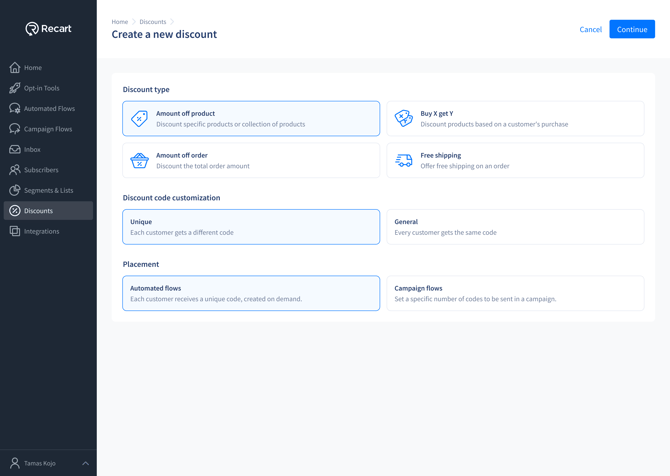
Go to Discounts → Create New
-
Choose Unique
-
Choose Automated flows
-
-
- Fill out relevant details for your discount code
-
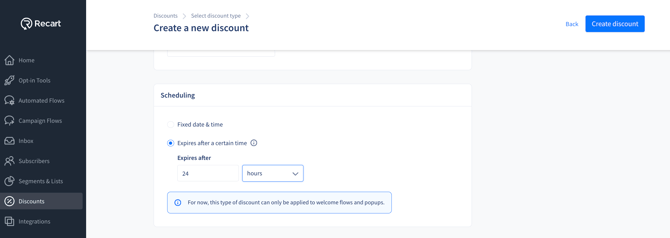
- Set Expires after a certain time (minutes / hours / days)
- Set Expires after a certain time (minutes / hours / days)
-
- Save / Activate
- Save / Activate
2. Add the discount to your popup
-
-
Open your popup editor
-
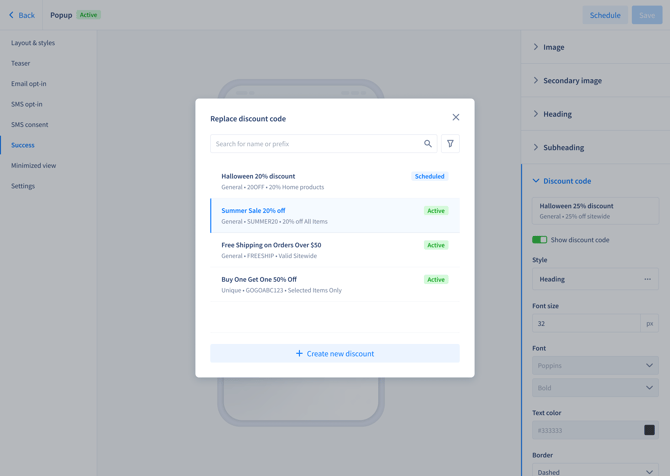
Go to the Success step
-
Click Add discount code
-
Select your expiring unique discount
-
3. Connect your popup to a Welcome Flow
-
-
Go to Opt-in Tools → Edit popup → Settings
-
Select your Welcome Flow and save
-
4. Use the popup discount in the Welcome Flow
-
-
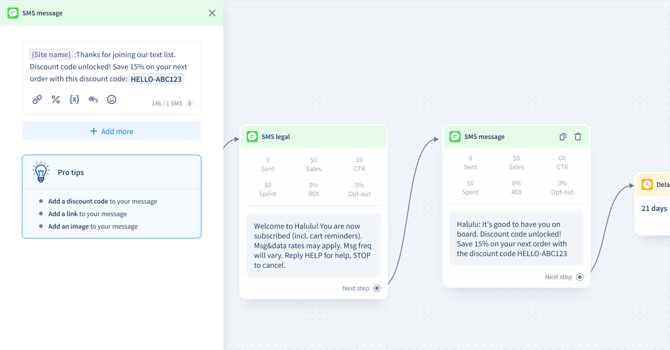
In the Welcome Flow message, insert the popup discount variable
-
-
-
Make sure the discount selected in the popup and the flow match
-
Styling the discount on the popup
You can customize how the discount code appears on the popup success step.
Available styling options:
-
-
Border style: Dashed / Dotted / Solid / None
-
Border radius
-
Heading-style text
-
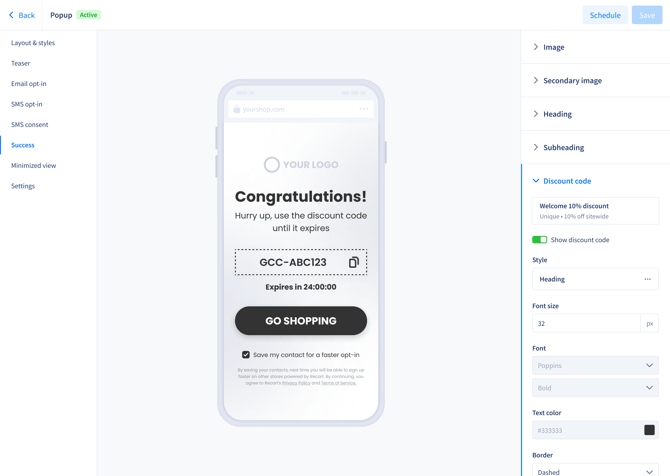
These options affect visual presentation only and do not change how the discount works at checkout.
Countdown timer
When using an expiring unique discount:
-
The countdown timer appears automatically
-
It can be shown or hidden in the popup editor
-
It is removed only if the discount code is replaced or removed
-
Countdown timers are not available for non-expiring discounts
Important limitations
-
Expiring unique discounts require a popup
-
Only one expiring discount per Welcome Flow
-
Popup and welcome flow should use the same code - a mismatch triggers a warning
-
Not available for 2-step (SMS Reply) popups
-
Shopify segments are not supported for this feature (if segmentation is modified in Shopify, the expiring code cannot be created)
Warning messages you may see
|
Warning |
What it means |
|---|---|
|
Discount Mismatch |
The discount selected in the popup does not match the discount used in the connected Welcome Flow. |
|
Active Discount Locked |
The discount cannot be deleted because it is currently used in an active popup or Welcome Flow. |
|
One Expiring Discount Per Flow |
Only one popup discount can be attached to a single Welcome Flow. Additional popup discounts are hidden. |
For more information, go to our Discount Codes in Recart Help Article. If you have any questions, you can also reach us at support@recart.com.