
Table of Contents
Why Enable Checkout SMS Opt-in
When shoppers complete a purchase, they're already engaged with your brand—making checkout an ideal moment to capture SMS consent. Subscribers who opt in here sync automatically to Recart, so you can message them right away.
Important:
You're responsible for making sure your SMS opt-in at checkout complies with the laws that apply to your business and your subscribers, including TCPA (US), CASL (Canada), and any local regulations.
Keep your opt-in language clear and honest about what subscribers will receive, and make sure your Privacy Policy and Terms of Service include SMS-specific terms before you turn this on. Recart gives you the tools to collect consent, but responsibility for lawful collection stays with your store.
Setup Steps
Follow these four steps to add an SMS opt-in checkbox to your checkout. Before you start, make sure your Privacy Policy and Terms of Service are published in Shopify — if they're not set up yet, follow our guide: How to Create Privacy Policy and Terms of Service in Shopify.Step 1: Update Your Shopify Policies
- Copy the templates from our SMS Marketing Terms and Conditions & Privacy Policy article
- In Shopify, go to Settings > Policies
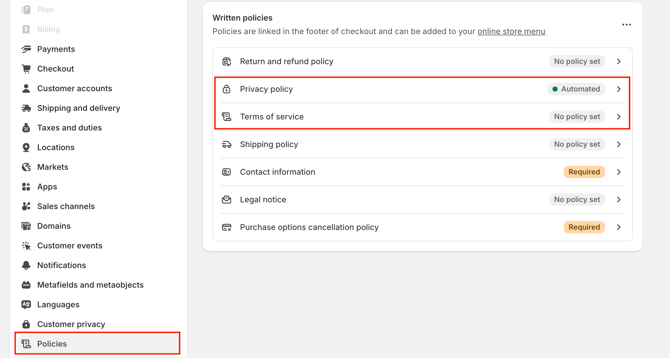
- Click on each to edit your Privacy Policy and Terms of Service pages
- Paste the filled-out templates at the end of each existing policy
- Click Save
Step 2: Enable the Phone Number Field
You need to display the phone number field at checkout to collect SMS subscribers.
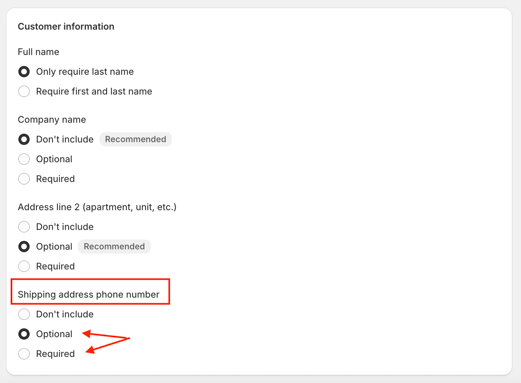
- In Shopify, go to Settings > Checkout
- Find Shipping address phone number in the Customer information section
- Set it to Required or Optional
- Click Save
Step 3: Turn On SMS Marketing Consent
This adds the SMS opt-in checkbox to your checkout page. For the exact consent wording, see Consent Disclosure Language below.
- In Shopify, go to Settings > Checkout
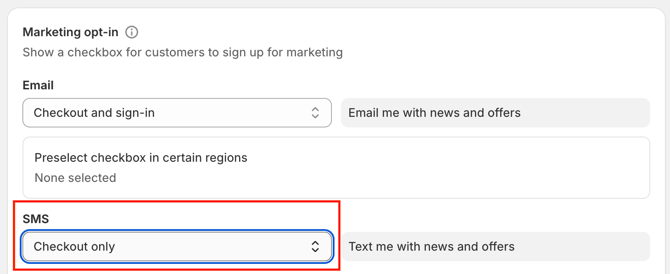
- Scroll to the Marketing options section
- In the SMS row, open the dropdown and select Checkout only
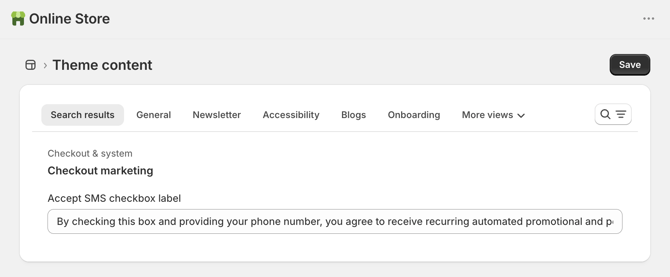
- Click the edit (pencil) icon next to the SMS label to update your disclosure
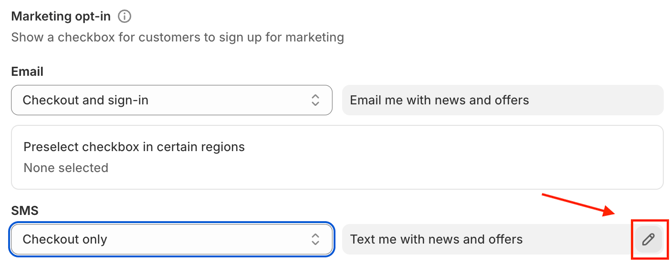
- Paste the relevant disclosure in the box (see Consent Disclosure Language below)
- Click Save
Step 4: Enable the Welcome Message in Recart
Greet new checkout subscribers with an automated welcome message.
- In Recart, go to SMS Welcome Messages
- Click on Welcome Checkout Subscription
- Update the wording of your flow. Your legal message is not editable to remain compliant - but you can include follow ups, add a discount code and use conditional splits in your flow; to name a few. Use our default welcome flow for inspiration.
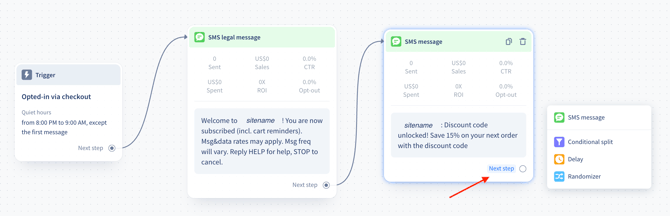
- Review your flow to make sure you've connected all your messages
- Click Active
Best Practices
- Required: Publish your Privacy Policy and Terms of Service before enabling SMS consent. Shopify won't allow the feature without them
- Required: Customize the checkbox label to set clear expectations - see disclaimer options below
- Recommended: Set the phone number field to Optional rather than Required to avoid checkout friction
- Avoid: Using vague opt-in language that doesn't clearly state what subscribers will receive
Consent Disclosure Language
The consent language you use depends on where your subscribers are and how your SMS is set up. Use the version that matches the phone number configured in your account.
-
Two-way messaging uses a number that can both send and receive texts, so subscribers can reply STOP to opt out or HELP for support. A common example is a TFN or a Short Code.
-
One-way messaging can only send, not receive — a common example is an alphanumeric sender ID, where your brand name appears as the sender instead of a phone number. Because replies don't reach a one-way sender, STOP and HELP don't work, so subscribers unsubscribe through the link included in each message.
Good news — your legal welcome message is already configured in your Recart account, based on whether you have one-way, two-way, or both types of messaging set up. No action needed here. The only place you need to update your consent language is your opt-in disclosure at checkout, below.
Disclosure for two-way messaging numbers:
By checking this box and providing your phone number, you agree to receive recurring automated promotional and personalized marketing text messages (including messages created using AI) from [Brand] at the number provided. Consent is not a condition of purchase. Reply HELP for help and STOP to cancel. Msg frequency varies. Msg & data rates may apply. You also agree to our Terms of Service and Privacy Policy.
Disclosure for one-way messaging numbers:
By checking this box and providing your phone number, you agree to receive recurring automated marketing text messages from [Brand] at the number provided. Consent is not a condition of purchase. Msg frequency varies. Msg & data rates may apply. To unsubscribe, use the unsubscribe link included in your messages. You also agree to our Terms of Service and Privacy Policy.
Not sure which applies to your store? Reach out to Recart Support and we'll check your account and advise on the best setup for the countries you're messaging.
What's Next
Once checkout SMS opt-in is live, you can:
- Create a Welcome Flow to engage new subscribers immediately
- Set up Abandonment Flows to recover lost sales
- Build Segments to target checkout subscribers with tailored campaigns
If you have questions, contact our Customer Support team, we're happy to help.