
What is Gladly?
Gladly is a customer service platform built around people, not tickets. Every interaction a customer has with your brand — email, chat, voice, or SMS — lives in a single, lifelong conversation timeline, so your support team always sees the full picture and can help customers faster.
Why integrate Gladly with Recart SMS?
Answering subscriber text messages one by one outside your helpdesk is very time-consuming for your Customer Service team. With the Gladly integration you can:
- Every subscriber reply lands in Gladly automatically, and your agents answer right from there — no switching between tools.
- SMS replies show up in the customer's single Gladly timeline next to email, chat, and voice, so your team never loses context.
- Conversations can be routed to the agent best equipped to handle them, with the customer's full history already in view.
How to set up the integration?
In Gladly
- Log in to your Gladly account
- Locate your Base API URL, your Gladly Username (your email address) and your Gladly Password (API Token)
- Copy all three — you will need it in your Recart account
In Recart
Please note: Gladly is a custom integration and may not appear on your Integrations page by default. If you don't see the Gladly settings in your Recart account, reach out to Recart Support and we'll activate it for your store.
- Log in to your Recart account
- Go to the Integrations page in Recart
- Find the Gladly card and open it
- Paste the Base API URL, your Gladly Username (your email address) and your Gladly Password (API Token)
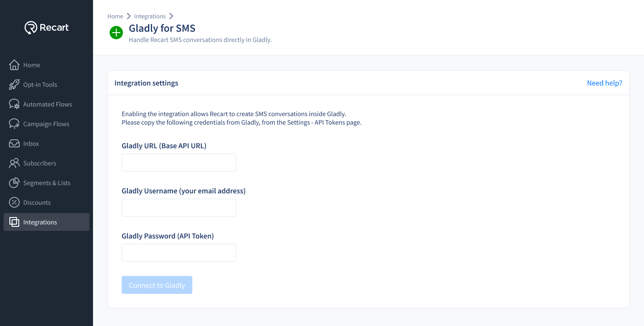
- Click Connect to Gladly
- Once the connection is verified, you'll see a success message and the integration will switch to Active
-1.png?width=670&height=370&name=Integrations%20-%20Gladly%20(Connected)-1.png)
That's it — Gladly is now connected to Recart!
How does the integration work?
When a subscriber replies to one of your SMS messages, Recart forwards the reply by email to your Gladly support inbox, and Gladly turns it into a conversation for your support team.
To answer, your agents write their message in Gladly above the ##- Please type your reply above this line -## marker. Recart picks up the answer and delivers it to the customer as a text message — from the customer's point of view, the entire conversation happens in one SMS thread.
Important notes
-
Only the text typed above the reply line is delivered to the subscriber — anything below the line (such as the quoted original message) is not sent
-
Standard SMS length applies to your agents' responses: longer replies are delivered as multiple message segments
Managing your Integration
- You can turn the integration on or off with the Active toggle
- If your API key or token isn invalid, Recart will show an inline error — double-check you copied the right API key or token and try again
- Removing the Integration:
- You can remove the integration completely by scrolling to the bottom of the integration page in Recart
- Click Remove Integration to disconnect the integration from your Recart account completely
- Please note: If your integration is removed completely, your data will stop syncing from that point of time. If you want to setup the integration again, you have to follow the steps above from the start again.
Need Help?
If you have any questions, do not hesitate to contact the Customer Support team, we are always happy to help. 😊