
Table of Contents
- Overview
- How to Connect Your Klaviyo Account
- Syncing Subscribers to Your Klaviyo List
- Segmentation Sync
- Event-Based Triggering (Available Upon Request)
- Troubleshooting & Tips
- Use Cases
1. Overview
Recart helps you grow your subscriber list through high-converting pop-ups and SMS-first opt-in tools. If you use Klaviyo for email marketing, you can connect your Klaviyo account to Recart to streamline your data and power more personalized automations.
This integration allows you to:
- Automatically sync emails and phone numbers collected by Recart into a Klaviyo list of your choice
- Use Klaviyo-created segments within Recart for targeting and flow logic
- Trigger Recart flows in real-time based on Klaviyo email events, such as email opens or clicks
- Manage your syncs using a secure OAuth connection, with daily segment syncs and webhook-based event syncing
Note: This is a one-way integration — data flows from Recart to Klaviyo, not the other way around.
2. How to Connect Your Klaviyo Account
Recart uses a secure OAuth connection. You no longer need to enter API keys manually.
In Recart
-
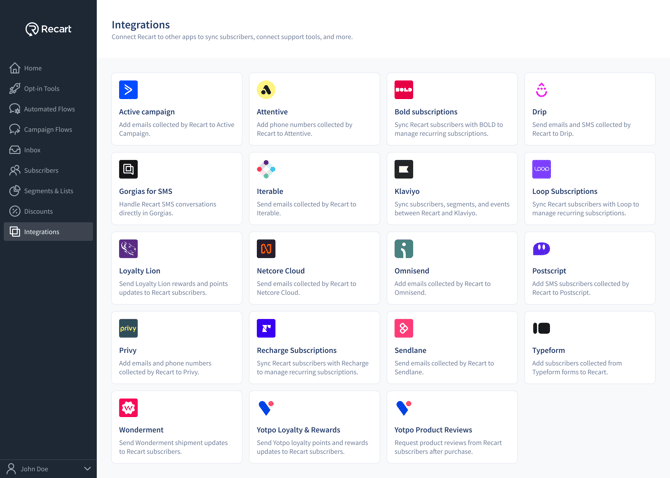
Go to the Integrations page in Recart
-
Find the Klaviyo card and open it
-
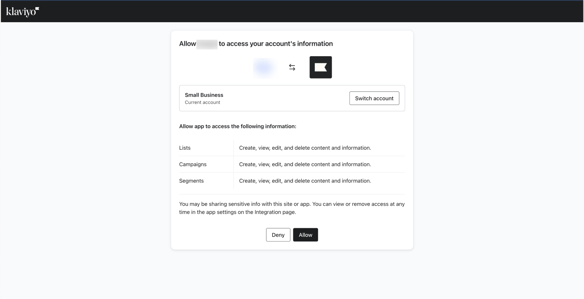
You’ll be prompted to log in to your Klaviyo account (if not already) and to be sure you're connected to the correct account
-
Click Continue to Klaviyo
-
Authorize Recart to access your Klaviyo data by clicking Allow
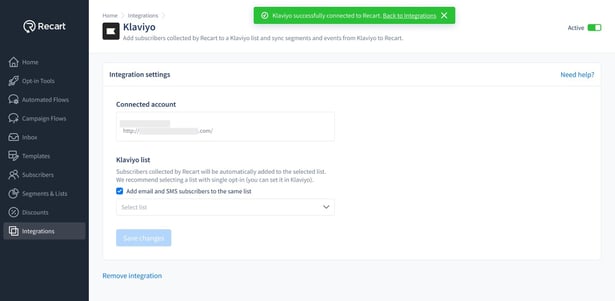
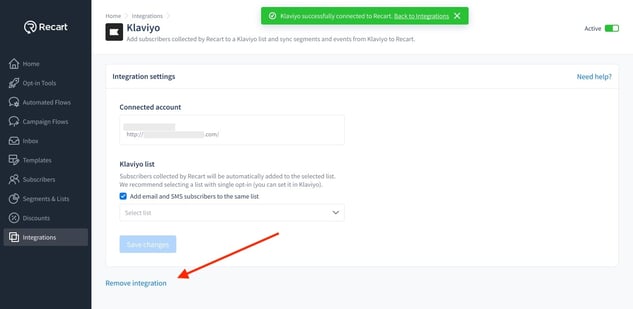
- Once the connection is verified, you'll see a success message and the integration will switch to Active
- If access is incomplete, you may see a banner asking you to Update Connection — simply follow the prompt to re-authorize
3. Syncing Subscribers to Your Klaviyo List
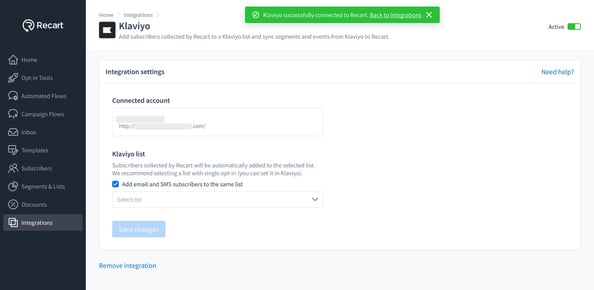
Once connected, you can choose which Klaviyo list to send your Recart subscribers to.
To set it up:
-
In the Klaviyo integration page in Recart, select the list you want to sync to
-
(Optional) Tick the checkbox to “Add email and SMS subscribers to the same list”
-
Click Save changes
All email addresses and phone numbers collected via Recart will be automatically added to the selected Klaviyo list.
Recart uses single opt-in by default — subscribers will not receive a Klaviyo confirmation email.
4. Segmentation Sync
Recart supports syncing Klaviyo-created segments for use in audience targeting. This allows you to apply Klaviyo segmentation logic within Recart when planning campaigns or building audiences.
What you can do:
-
Use the condition Is / Is not part of Klaviyo segment in Recart
-
Search and select your Klaviyo segments
-
Target campaigns based on synced segments
Where to set this up:
-
Go to Segments & Lists in your Recart dashboard
-
Click Create Segment
-
In the builder, select:
→ Is Member of Klaviyo segment/list
→ Choose from the list of synced Klaviyo segments
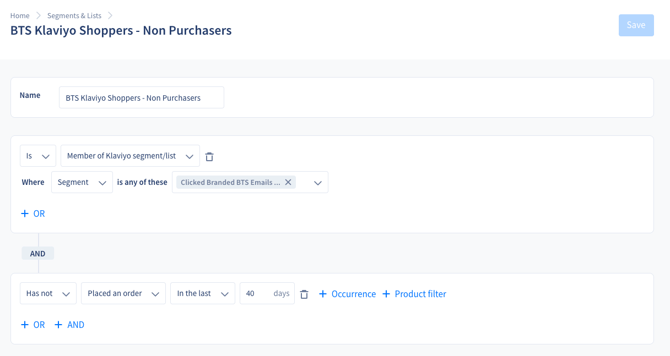
Once added, you can combine this condition with additional filters like purchase timing, product tags, or custom attributes.
Example Completed Segment:
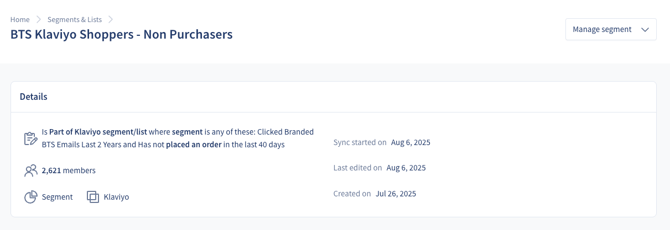
Sync details:
-
Segments sync once every 24 hours
-
A manual sync button is available in your Recart dashboard
-
Synced segments are labeled in Recart with a reminder that data is not real-time
⚠️ Klaviyo segments in Recart are asynchronous. Any updates to segments in Klaviyo may take up to 24 hours to reflect in Recart.
5. Event-Based Triggering (Available Upon Request)
For advanced use cases, Recart supports real-time flow triggering based specifically on Klaviyo Flow events (not Campaigns). This enables you to respond dynamically to subscriber actions with personalized automation.
Note: Event-based triggering is not available by default. To enable this feature, contact your CSM or email support@recart.com.
What you can do:
- Trigger Recart flows when a subscriber:
- Receives a Klaviyo email
- Clicks a Klaviyo email
- Personalize flow paths and timing based on email engagement
- Build behavior-driven journeys across email and SMS
Additional info:
- This is a separate feature from segmentation
- Event triggers are only available in Recart Automated Flows (not in campaigns or segmentation filters)
- Only Klaviyo Flows can be used as trigger sources — Campaigns are not supported
- These use a real-time webhook sync, separate from the daily segment sync
- A one-time event backfill may be required when activating the feature
Where to set this up:
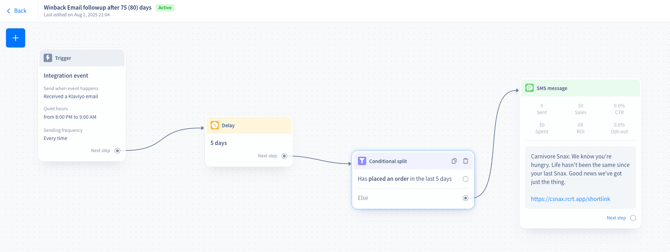
To set up a Klaviyo event-based flow:
- Go to Automated Flows in your Recart dashboard
- Select Integration Flows and choose Klaviyo
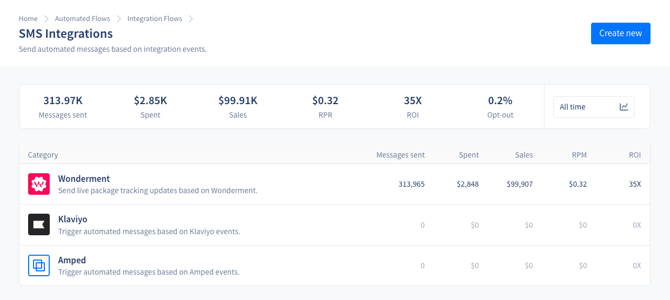
- Within Klaviyo Automated Flows, click Create New
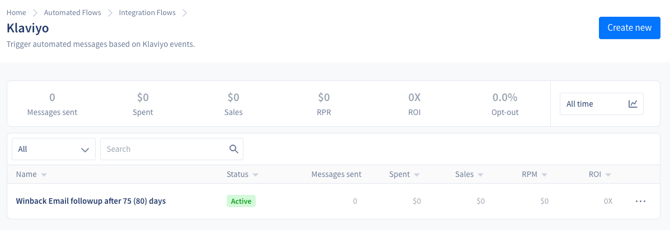
- From the trigger source list, choose Klaviyo
- Choose your event trigger:
- Email received
- Email clicked
- Build your flow with any desired logic (e.g., delays, conditions, message steps)
6. Troubleshooting & Tips
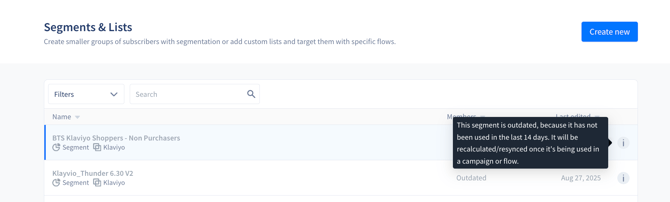
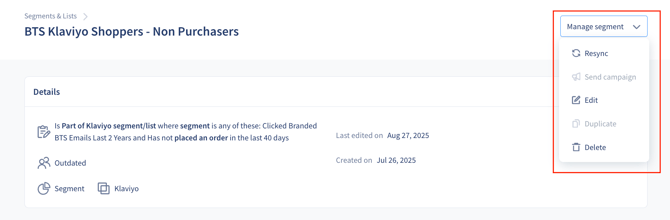
- Klaviyo segments that aren’t used in any draft or active flow, or in a scheduled campaign, will stop syncing after 2 weeks. They’ll be marked as outdated, but you can recalculate them manually from the Segment Page. Click on your outdated segment → context menu → click resync.
-
If your integration becomes inactive, simply toggle it back on from the Klaviyo integration page.
.png?width=653&height=269&name=Integrations%20-%20Klaviyo%20-%20OAuth%20connection%20successful%20(2).png)
-
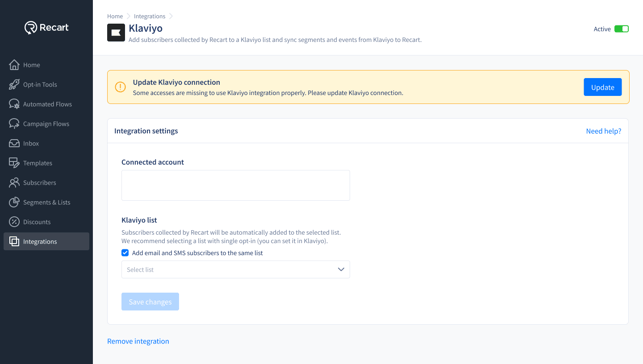
If you encounter the “Update Klaviyo Connection” message, click Update and follow the OAuth prompt.
-
You can remove the integration at any time by clicking Remove Integration at the bottom of the Klaviyo integration page in Recart.
7. Use Cases
Here are a few example use cases to give you an idea of what’s possible.
Segmentation-Based
Segmentation Sync Use Case (Basic)
Follow up with email engagers who didn’t convert
If you’ve sent a Klaviyo campaign but didn’t include an SMS, you can create a synced Klaviyo segment in Recart of users who clicked the email but didn’t purchase. From there, send a targeted SMS campaign reminding them of the product or offer, or even include a limited-time discount to increase urgency.
This is a great way to recover potential revenue from high-intent users without spamming your entire list.
Segmentation Sync Use Case (Advanced – Tapcart example)
Follow up with Tapcart users using Klaviyo abandoned cart emails
Although Recart doesn’t integrate directly with Tapcart, you can still create a synced segment of users who received a Klaviyo abandoned cart email but didn’t complete their purchase. Then, send them a follow-up SMS from Recart to recover the abandoned cart.
This bridges the gap between tools and ensures your mobile shoppers don’t fall through the cracks.
Event-Based
Event-Based Triggering Use Case (Basic)
Trigger SMS after a key email click
Set up an event-based automation in Recart to trigger when someone clicks a link in a Klaviyo flow email. For example, if they click a product recommendation or a shipping update, you can follow up instantly with an SMS for more details, a promotion, or a support nudge.
This enables real-time follow-ups that feel personal and relevant — without manual work.
Event-Based Triggering Use Case (Advanced – Back in stock example)
Trigger back-in-stock messages via Klaviyo flows
If you’re using Klaviyo to send back-in-stock email flows based on product availability, you can also trigger a Recart flow when the email is received. This lets you follow up with SMS — even though Recart doesn’t yet support native back-in-stock automation.
It’s a clever workaround to amplify reach during high-intent moments.
Note: Recart currently cannot process dynamic product variables, so SMS messages should either be:
• General (e.g., “Your favorite item is back — don’t miss out!”), or
• Sent via separate Klaviyo flows per product.
Need Help?
If you have any questions, do not hesitate to contact the Customer Support team, we are always happy to help. 😊