
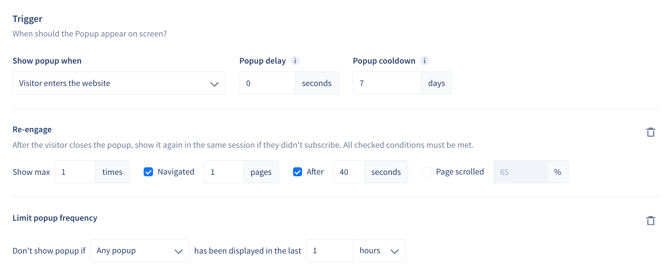
The Trigger section of the popup editor has been redesigned, and it now carries two settings you didn't have before: a popup cooldown you can see and edit, and a rule that holds a popup back when another popup has recently been shown.
What's new
Popup cooldown
How long to wait before showing a popup again after it's closed, whether or not the visitor subscribed.
- Pre-filled at 7 days, and can be set anywhere from 1 to 30 days
- It's the third field in the trigger row, already on every popup — there's nothing to add
Limit popup frequency
Holds this popup back based on other popups' impressions.
- Reads as Don't show popup if Any popup has been displayed in the last 1 hours
- Switch Any popup to Specific popups to choose which ones count
- The window runs from 1 minute to 30 days
- Not added by default — add it with + Limit popup frequency, remove it with the trash icon
Both are available on every trigger type except externally triggered popups.
What hasn't changed
Re-engage works as it always has, with the same four settings — it now sits as a block you can add or remove, on popups triggered when a visitor enters the website. On your existing popups, cooldown is pre-filled at 7 days, Re-engage keeps your current settings, and no frequency limit is added anywhere.
Where to make changes
Open the popup editor, click on Settings in the left hand panel and go to the Trigger section:
If visitors were seeing an exit-intent popup straight after a welcome popup, a frequency limit is the setting to reach for.
For more on setting up popups, check out Popups - The Best Converting Opt-in Tools.
If you have any questions or need support setting these up, feel free to reach out to us at support@recart.com — we're happy to help!