
By connecting Privy to Recart, the email opt-ins you collect through your Recart opt-in tools are automatically synced into your Privy account. Every time a visitor subscribes through a Recart popup, their email address — along with the details captured in the opt-in — is sent to Privy, so you can keep growing your email and phone number list and follow up without any manual exports.
The connection is set up with a single API token: you create a non-expiring token in Privy and paste it into Recart. That's it.
Good to know:
- Syncing starts from the moment you connect. Opt-ins collected before the integration was activated aren't imported (no historical backfill)
- If a contact already exists in Privy, Recart merges the new data into their profile — existing contacts are never overwritten
- Only email opt-ins are synced. Recart syncs the phone number but does not send SMS consent to Privy
Here are all the steps you need to connect your Privy account to Recart:
In Privy
- Log in to Privy and open your account settings
- Create a new API token. Make sure it's set as a non-expiring token so the connection keeps working long-term
- Copy the API token
In Recart
- Log in to your Recart account
- Go to the Integrations page
- Find the Privy card and open it
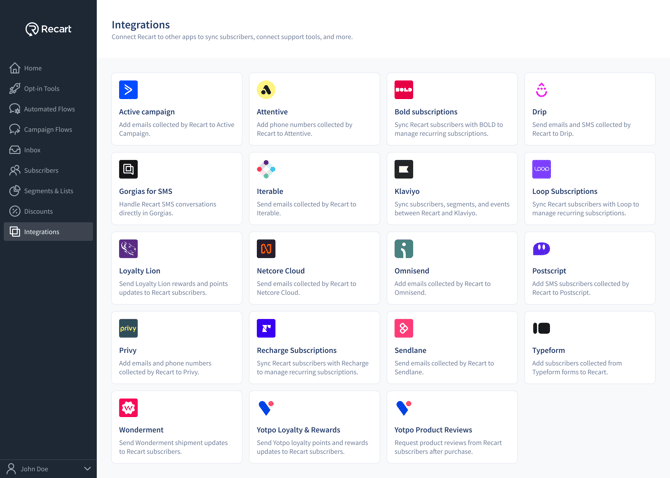
- Paste your Privy API token into the field. If you need a reminder on where to find it, open the token instructions tooltip
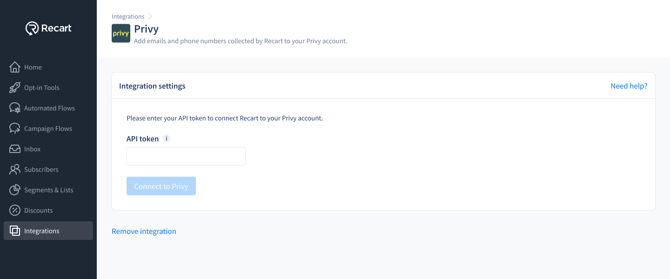
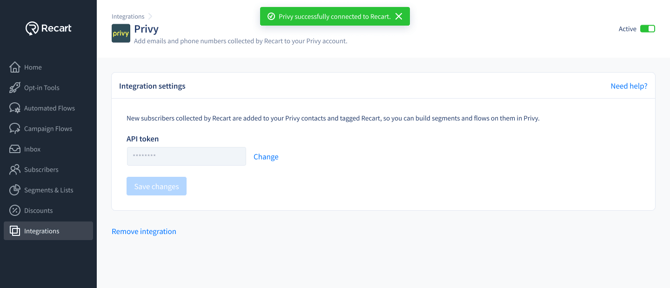
- Click Connect. Once the token is verified, you'll see a success message and the integration will switch to Active
Manage your Integration:
-
You can turn the integration on or off with the Active toggle, and update your token anytime using the Change option
-
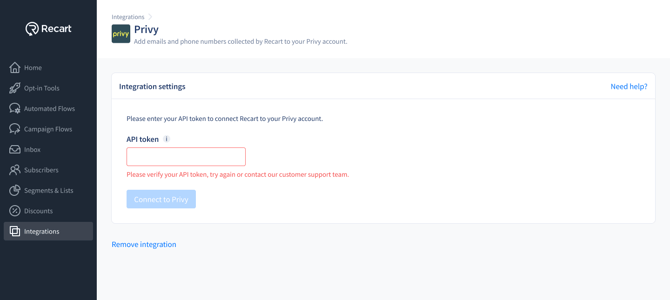
If your token isn't valid, Recart will show an inline error — double-check that you copied the full, non-expiring token from Privy and try again
That's it — Privy is now connected to Recart, and your contacts will sync automatically. 🎉
What gets synced:
Once connected, every new email opt-in and phone number collected through your Recart opt-in tools is sent to Privy, together with the form data captured in that opt-in (such as the discount offered).
Because Privy organizes contacts with tags rather than lists, Recart-synced contacts are automatically tagged so you can find them easily. Each contact gets a recart tag plus a tag for the specific opt-in tool they subscribed through.
Need Help?
If you have any questions, do not hesitate to contact the Customer Support team, we are always happy to help. 😊