
Once you install Recart, you'll notice a Session ID being added to the notes section on your order pages. This is completely normal — it's how Recart tracks orders and calculates your attributed revenue accurately.
Why is a Session ID added to orders?
From the point you have Recart installed, a Session ID is added to each store visit and order. This doesn't mean every order is attributed to Recart — the ID simply helps our app identify which Shopify order belongs to which Recart subscriber, which is how attributed revenue is tracked accurately.
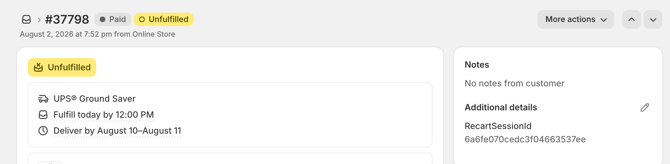
If the app can't identify a Recart subscription from the ID, the sale won't be attributed, but the Session ID will still be visible on the order page.
Seeing a Shopper ID on an older order?
Recart previously added a Shopper ID to orders alongside the Session ID. This was phased out in July 2026 and is no longer added to new orders. Orders placed before then may still show a Shopper ID — this is expected, and it's safe to ignore. It doesn't affect your Session ID, your tracking, or your revenue attribution.
.png?width=670&height=352&name=downloads.intercomcdn.comio493538488d50dfe746336868bbb600b01recart+(1).png)
If you have any remaining questions, don't hesitate to contact the Customer Support team.