
Table of Contents
- What You Can Test
- Before You Begin
- Send a Test Message
- Testing from Outside the US or Canada
- Things to Know
- Best Practices
- What's Next
What You Can Test
Before activating an automated flow or campaign, you can send test messages to verify:
- Links work correctly
- Discount codes display properly
- Images and attachments load (for MMS messages)
- Message formatting looks right on mobile devices
Before You Begin
- Test messages can only be sent to US and Canadian phone numbers (plus American Samoa, Guam, Northern Mariana Islands, Virgin Islands, and Puerto Rico)
- You can send tests to up to 5 phone numbers at a time
- Phone numbers must be entered without spaces or special characters
Send a Test Message
- Open the automated flow or campaign you want to test.
- Click on the message step you want to preview.
- At the bottom of the editor panel, click Send test (paper plane icon).
- Enter a phone number in the required format (no spaces).
- Click Send test.

The test message arrives within seconds. Recart saves your number for future tests, you can change it anytime.
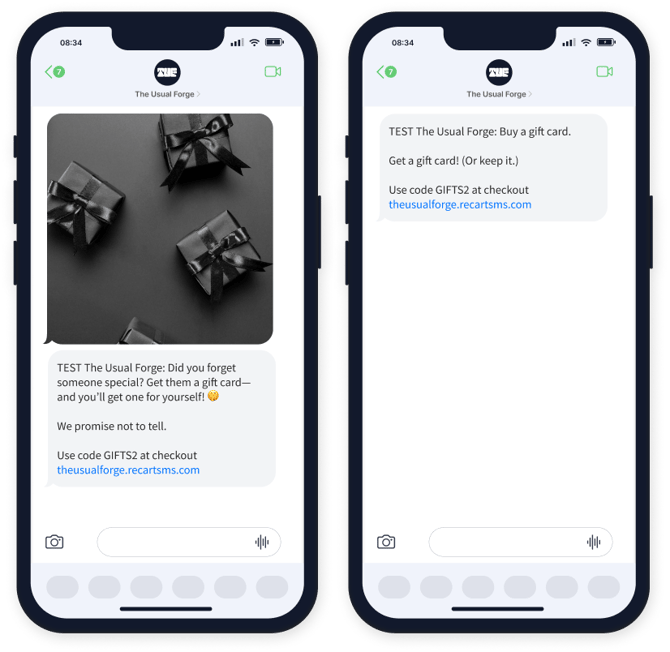
Note: All test messages include "TEST" before your business name so you can easily identify them.

Testing from Outside the US or Canada
If you're located outside the US or Canada, you have two options:
- Purchase a US SIM card for your mobile device
- Use a virtual SMS number through a service like Toky
Things to Know
| Detail | What It Means |
|---|---|
| Cost | Test messages are free—no charge to your account |
| Statistics | Test messages don't appear in your flow or campaign stats |
| Subscriber list | Numbers that receive tests are not added to your subscriber list |
| Quiet Hours & Smart Sending | These settings don't apply to tests—messages send immediately |
| "TEST" prefix | All test messages show "TEST" before your business name |
Best Practices
- Recommended: Test every flow and campaign before activating, especially if they include discount codes or time-sensitive links.
- Recommended: Test on multiple devices if possible to check formatting across different phones.
- Recommended: Verify that links open correctly and land on the right pages.
- Avoid: Assuming a message looks the same on all devices, always preview on an actual phone.
What's Next
Once you've tested your messages, you can:
- Activate your automated flow to start sending to subscribers
- Schedule or send your campaign to reach your audience
If you have questions, contact our Customer Support team—we're happy to help.