> For the complete documentation index, see [llms.txt](https://help.recart.com/llms.txt). Markdown versions of documentation pages are available by appending `.md` to page URLs; this page is available as [Markdown](https://help.recart.com/holiday-playbooks/bfcm.md).
# BFCM
Covers BFCM campaign ideas, popup designs and offers, plus a step-by-step series to get your account ready for Black Friday and Cyber Monday.
Black Friday and Cyber Monday (BFCM) are the busiest sending days of the year. Shoppers expect your best offer, inboxes and phones are crowded, and the brands that win plan early, reward their subscribers first and keep their offers simple.
This playbook covers what to send, how to theme your popups, and which offers work best for BFCM. Use the step-by-step series below to get your account ready in the weeks before.
{% hint style="info" %}
Black Friday is the day after US Thanksgiving (the fourth Thursday in November), and Cyber Monday is the Monday after. Many brands now run their offers across the whole week, often called Cyber Week. After Cyber Monday, move on to [Last-Minute Holiday Gifting](/holiday-playbooks/holiday-shipping-and-last-minute-gifting.md).
{% endhint %}
### Get your account ready, step by step
Work through these in order, starting several weeks before Black Friday.
#### Before the rush
1. [BFCM #1 - Don't Skip These Housekeeping Steps](/holiday-playbooks/bfcm/1-housekeeping-steps.md) - check your account settings, business details and time zone
2. [BFCM #2 - Your BFCM Calendar](/holiday-playbooks/bfcm/2-your-bfcm-calendar.md) - month-by-month calendars of what to send, from October to New Year
3. [BFCM #3 - Smarter List Growth Starts Now](/holiday-playbooks/bfcm/3-smarter-list-growth.md) - grow a list of subscribers who are more likely to buy
4. [BFCM #4 - Refresh Your Popups for Peak Season](/holiday-playbooks/bfcm/4-refresh-your-popups.md) - seasonal designs, OneClick and exit-intent popups
#### Planning the sends
5. [BFCM #5 - Offer Planning to Maximize Conversions](/holiday-playbooks/bfcm/5-offer-planning.md) - pick one to three clear offers
6. [BFCM #6 - Smart Sending Starts Now](/holiday-playbooks/bfcm/6-smart-sending.md) - timing tips for crowded inboxes
7. [BFCM #7 - Cut the Clutter, Boost Performance](/holiday-playbooks/bfcm/7-cut-the-clutter.md) - shorter messages that cost less to send
#### The final stretch
8. [BFCM #8 - Final Checks and Flow Testing](/holiday-playbooks/bfcm/8-final-checks.md) - test your flows, links and offers
9. [BFCM #9 - Survive Crunch Week Like a Pro](/holiday-playbooks/bfcm/9-survive-crunch-week.md) - quick reminders for the busiest week
### Key dates and lead time
* **October:** housekeeping, list growth and your BFCM popups
* **Early November:** set your offer, build your discounts and schedule your campaigns
* **About a week before:** tease the sale and tell subscribers they'll get in first
* **The days before Black Friday:** VIP early access for subscribers
* **Black Friday:** your main launch
* **The weekend:** a reminder, or a second offer such as free shipping
* **Cyber Monday:** a fresh push, then a last chance
* **After Cyber Monday:** thank your customers and move on to holiday gifting
### Campaign send plan
Six to eight sends are enough for the BFCM week. For the full season, see [BFCM #2 - Your BFCM Calendar](/holiday-playbooks/bfcm/2-your-bfcm-calendar.md). Use these messages as a starting point and customize them to suit your brand. Recart adds your site name to the start of every message automatically (shown here as \[Site Name]), and you can personalize further with [variables](/sms/writing-messages/use-variables-in-sms-flows.md) like the subscriber's first name (shown here as \[First Name]).
| Send | When | Goal |
| ---------------------- | -------------------------------- | ---------------------------------- |
| 1. Teaser | About a week before Black Friday | Build anticipation |
| 2. VIP early access | 1-2 days before Black Friday | Reward subscribers |
| 3. Black Friday launch | Black Friday morning | Drive the first wave of orders |
| 4. Weekend reminder | Saturday or Sunday | Reach anyone who missed the launch |
| 5. Cyber Monday | Cyber Monday morning | A fresh reason to buy |
| 6. Last chance | Cyber Monday evening | Create urgency |
| 7. Thank you | A few days after Cyber Monday | Build loyalty for the holidays |
#### Sample messages
**1. Teaser**
"\[Site Name]: Our Black Friday sale is almost here - and subscribers get in first. Keep an eye on your texts!"
**2. VIP early access**
"\[Site Name]: Hi \[First Name], you're in! Shop our Black Friday sale before everyone else, with up to \[40%] off: \[link]"
**3. Black Friday launch**
"\[Site Name]: Black Friday is here! Up to \[40%] off everything, today only: \[link]"
**4. Weekend reminder**
"\[Site Name]: Still deciding? Our Black Friday deals run all weekend, and shipping is free: \[link]"
**5. Cyber Monday**
"\[Site Name]: Cyber Monday deals are live! Spend \[$75] and get \[15%] off, or \[$150] for \[25%] off: \[link]"
**6. Last chance**
"\[Site Name]: Last chance! Our BFCM deals end at midnight: \[link]"
**7. Thank you**
"\[Site Name]: Thank you for shopping with us this BFCM! Need gifts that arrive in time? Here's our order-by date: \[link]"
#### Send tips
* Send your VIP early access to your most engaged subscribers first - they buy faster and spend more
* Keep messages short and lead with the offer - inboxes and phones are at their busiest
* Add a product image to your early access and Black Friday launch sends
* When you add the first name variable, set a fallback like "there", so the message still reads well for subscribers whose name you don't have
[How to schedule SMS campaigns in Recart](/sms/campaigns/run-successful-sms-campaigns-with-recart.md)
[Add images to SMS messages](/sms/writing-messages/add-images-to-sms-messages.md)
[Create SMS segments and lists](/sms/subscribers-and-lists/create-sms-segments-and-lists.md)
### Popup ideas
Your popup is often the first thing a BFCM shopper sees. Lead with your offer, keep the design bold and simple, and make the button say exactly what they get. Four directions to try - two full-screen and two lightbox popups:
#### 1. Black Friday sale
**Design:** A full-screen popup with a bold headline on a black background and a product photo. Give subscribers something extra on top of the sale.
**Headlines to try:**
* Our biggest sale of the year
* Black Friday starts here
* Up to \[40%] off - subscribers get more
**Button text to try:** Get my extra \[10%] · Unlock my deal
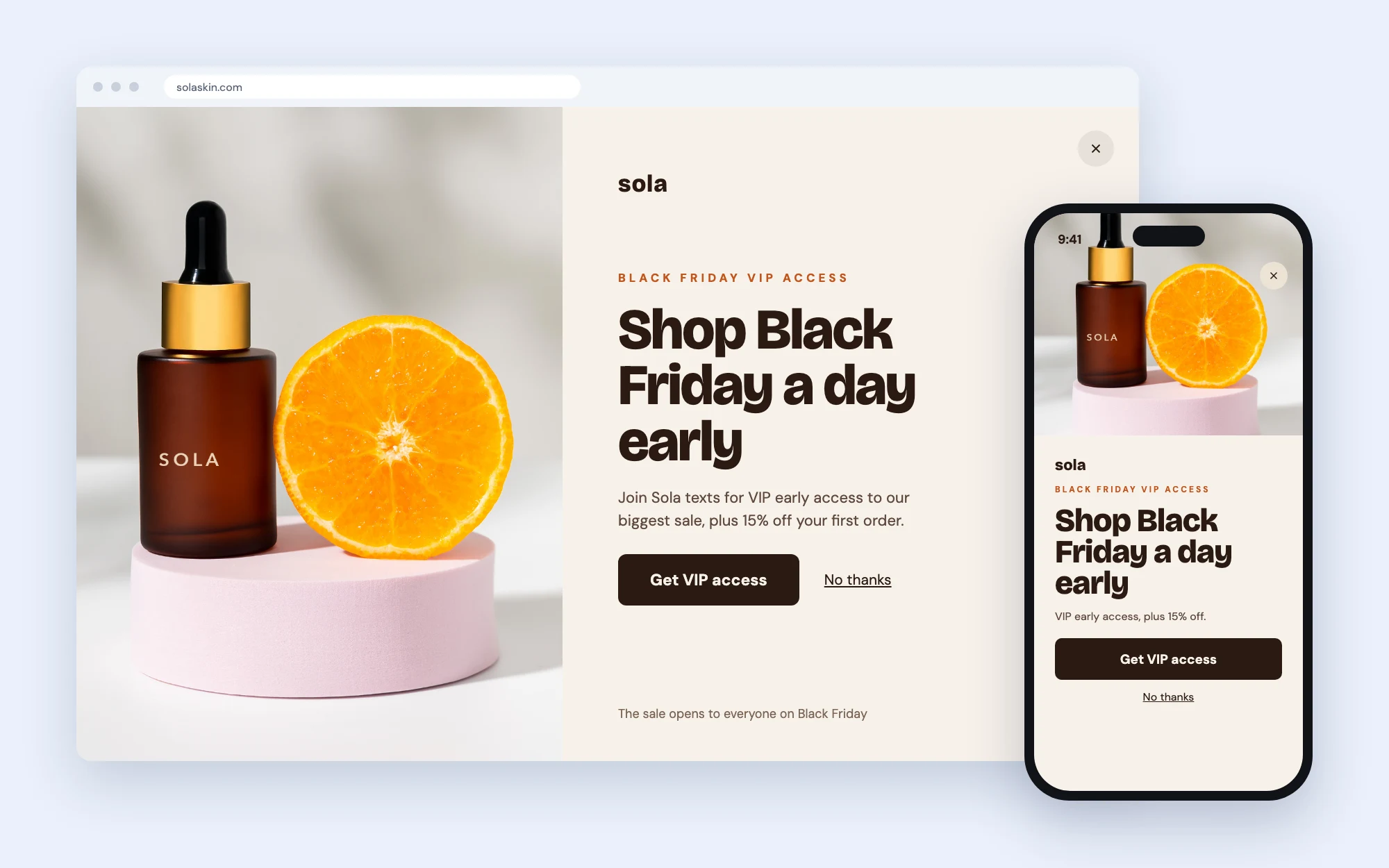
#### 2. VIP early access
**Design:** A full-screen popup with a product photo on one side and the offer on a light background. Say when the sale opens to everyone in small text at the bottom.
**Headlines to try:**
* Shop Black Friday a day early
* VIPs get first pick
* Skip the Black Friday rush
**Button text to try:** Get VIP access · Count me in
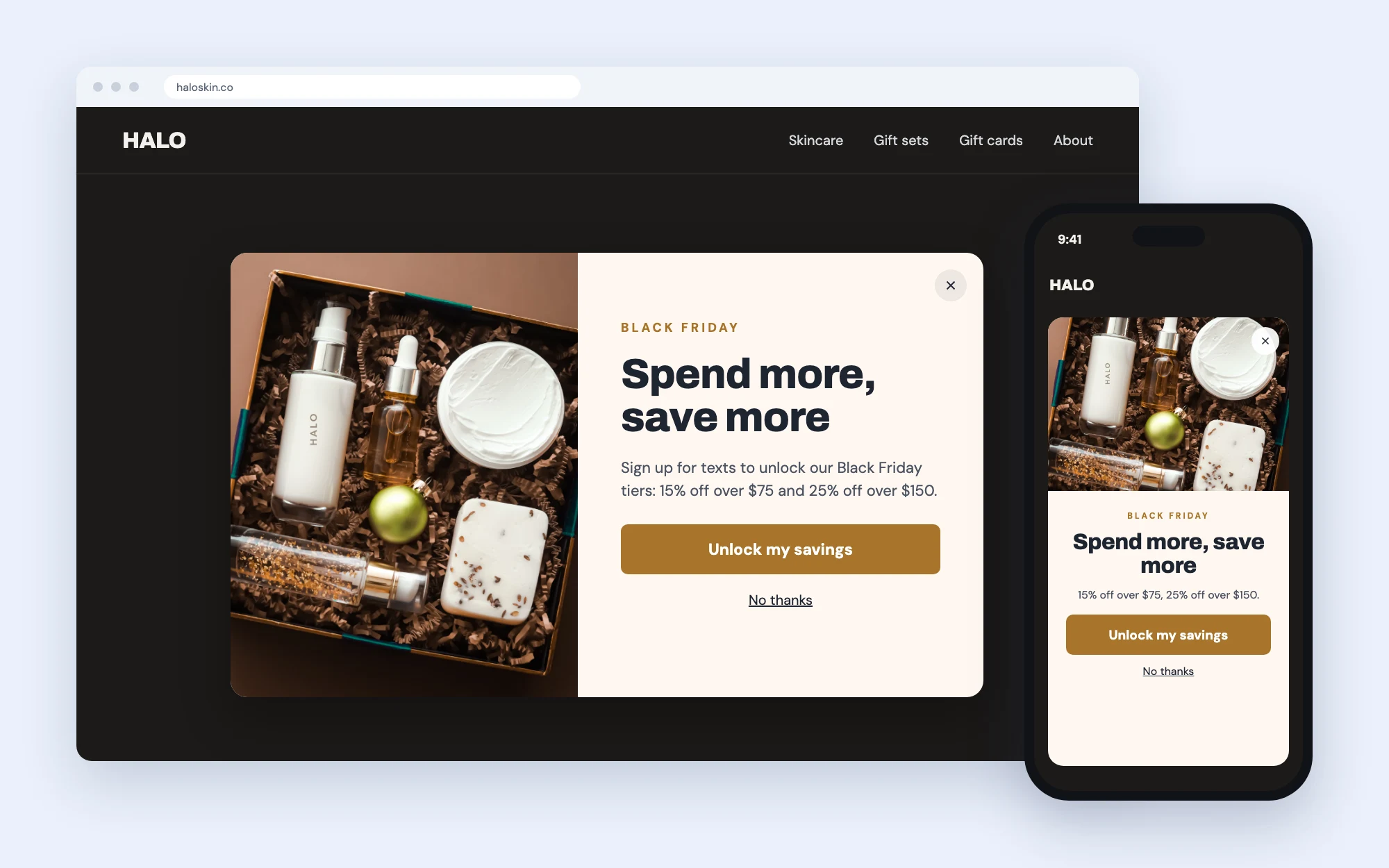
#### 3. Spend more, save more
**Design:** A lightbox popup over your store page, with a product photo on one side and your offer tiers on the other. Tiers raise your order value and are easy to understand at a glance.
**Headlines to try:**
* Spend more, save more
* Up to \[25%] off - the more you buy
* \[15%] off \[$75], \[25%] off \[$150]
**Button text to try:** Unlock my savings · Shop the tiers
#### 4. Cyber Monday offer
**Design:** A lightbox popup with a product photo on one side and the offer on a card with a thin border. On mobile, keep just the card. Schedule it to replace your Black Friday popup on Cyber Monday, so returning shoppers see a fresh offer.
**Headlines to try:**
* \[30%] off every \[snack box]
* Cyber Monday, today only
* One more day of deals
**Button text to try:** Get my \[30%] off · Shop Cyber Monday
{% hint style="info" %}
Keep your BFCM popup running alongside a [OneClick Popup](/list-growth/popups/oneclick-popup.md) for returning visitors, and add an [exit-intent version](/list-growth/popups/exit-intent-popup.md) to catch shoppers before they leave. Make sure your Welcome Flow's first message matches the offer on the popup.
{% endhint %}
[Create a welcome popup](/list-growth/popups/welcome-popup.md)
[Schedule your opt-in tools](/list-growth/testing-and-scheduling/scheduling-opt-ins.md)
[Customize your CTA button](/list-growth/popups/customizing-your-cta-button-in-popups.md)
### Discount ideas
One to three clear offers are enough. Shoppers compare a lot during BFCM, so make your offer easy to understand in a second.
* **Sitewide sale:** a percentage off everything, or up to a percentage off selected products
* **VIP early access:** let subscribers or your best customers shop the sale first
* **Tiered discounts:** spend more, save more, for example $10 off $75 and $25 off $150
* **Bundles and BOGO:** ready-made sets or buy-one-get-one on selected products
* **Gift with purchase:** a free sample, accessory or extra item over a set order value
* **Cyber Monday offer:** a fresh deal, like free shipping or a new tier, to give shoppers a second reason to buy
#### Discount code ideas
Keep codes short - one word or a word and a number - so they're easy to remember and type on a phone.
| Offer | Code ideas |
| ------------------ | --------------- |
| Sitewide sale | BF30 · BLACK |
| VIP early access | VIP · EARLY |
| Tiered discounts | SAVE10 · SAVE25 |
| Bundles and BOGO | BOGO · BUNDLE |
| Gift with purchase | GIFT · BONUS |
| Cyber Monday offer | CYBER · CM20 |
{% hint style="info" %}
For unique and expiring codes, Recart adds six random characters to your prefix (for example, BF30ABC123). A short prefix keeps the full code easy to read.
{% endhint %}
[Create and manage discount codes](/discounts/create-discount-codes-in-recart.md)
[Expiring discount codes](/discounts/expiring-discount-codes.md)
### Recart setup checklist
1. Work through steps 1-4 of the series above in October
2. Create your BFCM discounts, with start and end dates (and any VIP early-access code)
3. Build your BFCM popup, OneClick Popup and exit-intent popup, and schedule them
4. Update your Welcome Flow's first message to match the popup offer
5. Add your offer to your abandoned cart and checkout messages, and set a reminder to remove it when the sale ends
6. Schedule your campaigns, then follow [BFCM #8 - Final Checks and Flow Testing](/holiday-playbooks/bfcm/8-final-checks.md) before anything goes live
[Abandoned cart flow](/sms/automated-flows/automated-flows-abandoned-cart.md)
[Test Recart SMS messages](/sms/getting-started/test-recart-sms-messages.md)
If you need help planning your BFCM sends, [contact the Recart Support team](/contact-recart-support.md). We'd be happy to help!
---
# Agent Instructions
This documentation is published with GitBook. GitBook is the documentation platform designed so that both humans and AI agents can read, navigate, and reason over technical content effectively. Learn more at gitbook.com.
## Querying This Documentation
If you need additional information that is not directly available in this page, you can query the documentation by asking a question.
Perform an HTTP GET request on the following URL with the `ask` and `goal` query parameters:
```
GET https://help.recart.com/holiday-playbooks/bfcm.md?ask=&goal=
```
`ask` is the immediate question: it should be specific, self-contained, and written in natural language.
`goal` is what the user is ultimately trying to achieve, the reason they need the answer. Sharing it helps GitBook give you a better, more relevant answer. A goal is most helpful when it describes the outcome the user wants rather than restating the question. For example, with `ask=how do I create an API token`, a goal like `automate deployments from our CI pipeline` lets GitBook tailor the answer to that use case.
The response will contain a direct answer to the question and relevant excerpts and sources from the documentation.
Use this mechanism when the answer is not explicitly present in the current page, you need clarification or additional context, or you want to retrieve related documentation sections.