> For the complete documentation index, see [llms.txt](https://help.recart.com/llms.txt). Markdown versions of documentation pages are available by appending `.md` to page URLs; this page is available as [Markdown](https://help.recart.com/holiday-playbooks/bfcm/2-your-bfcm-calendar.md).
# BFCM #2 - Your BFCM Calendar
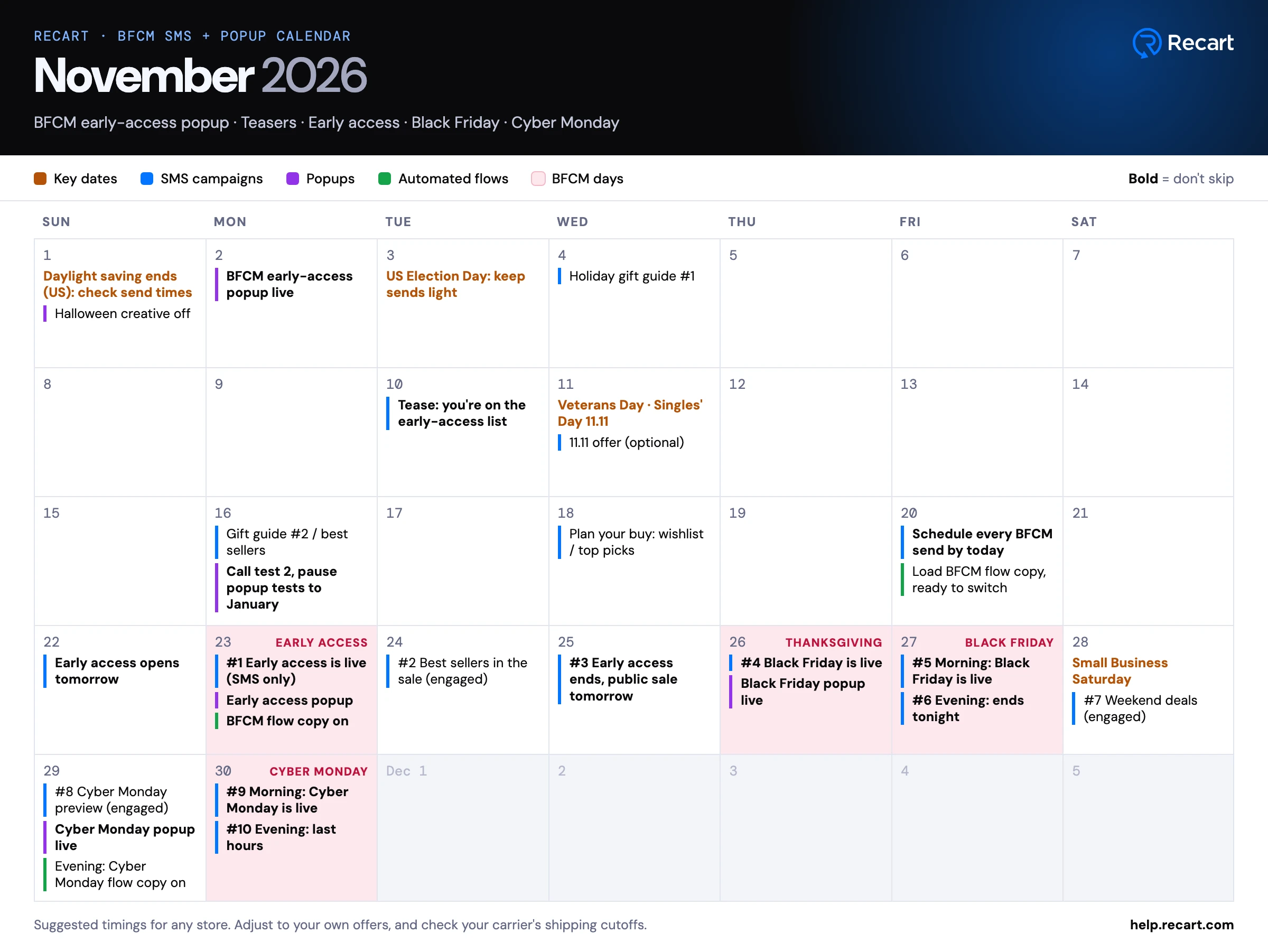
October, November and December calendars with suggested dates for your BFCM SMS campaigns, popups and automated flows.
Planning your BFCM sends is easier when you can see the whole season at once. These calendars map out what to send, when to switch your popups and flows, and which dates to plan around, from October to New Year.
Every date is a suggestion. Keep the order and the spacing, and fit your own offers and launches around them. **Bold** items are the ones not to skip.
{% hint style="info" %}
The calendars follow US dates. Early access for SMS subscribers opens on the Monday of Thanksgiving week, and the public sale starts on Thanksgiving. If your dates are different, keep the same order and spacing.
{% endhint %}
### October: get ready
* Audit your automated flows and check whether any [custom triggers](/sms/automated-flows/custom-triggers-automated-flow-use-cases.md) are worth adding
* Run a [popup A/B test](/list-growth/testing-and-scheduling/popup-a-b-testing.md) for about three weeks, then a second one
* Build your BFCM [segments](/sms/subscribers-and-lists/create-sms-segments-and-lists.md): engaged subscribers, recent buyers and VIPs
* Write your BFCM, Cyber Monday and holiday flow copy now, so switching it on later is quick
### November: Black Friday and Cyber Monday
* Switch on your BFCM early-access popup at the start of November
* Start teasing the sale about two weeks before early access opens
* Stop popup tests about a week before early access, and keep them paused until January
* Schedule every BFCM send by the Friday before Thanksgiving week
* Send twice on Black Friday and on Cyber Monday: once in the morning and once in the evening
* Swap your popup and flow copy to Cyber Monday on the Sunday evening before
### December: holiday gifting
* Switch your popups and flows to holiday creative a couple of days after Cyber Monday
* From Green Monday, remind subscribers of your "order by" dates (check your carrier's shipping cutoffs)
* Once shipping cutoffs pass, promote gift cards
* After Christmas, run your after-Christmas sale, switch to a New Year popup and set your flows back to your everyday copy
### Download the calendar
[Download the BFCM calendar (PDF)](https://2167119381-files.gitbook.io/~/files/v0/b/gitbook-x-prod.appspot.com/o/spaces%2F2I45aTZ733MBi8Vps3Ib%2Fuploads%2FUSRu2pBbQ7ipEheVbexq%2Fbfcm-calendar-2026.pdf?alt=media)
For the full BFCM send plan with sample messages, popup ideas and offers, see the [BFCM playbook](/holiday-playbooks/bfcm.md). After Cyber Monday, move on to [Last-Minute Holiday Gifting](/holiday-playbooks/holiday-shipping-and-last-minute-gifting.md).
If you need help planning your campaigns or reviewing your flows, [contact the Recart Support team](/contact-recart-support.md). We'd be happy to help!
---
# Agent Instructions
This documentation is published with GitBook. GitBook is the documentation platform designed so that both humans and AI agents can read, navigate, and reason over technical content effectively. Learn more at gitbook.com.
## Querying This Documentation
If you need additional information that is not directly available in this page, you can query the documentation by asking a question.
Perform an HTTP GET request on the following URL with the `ask` and `goal` query parameters:
```
GET https://help.recart.com/holiday-playbooks/bfcm/2-your-bfcm-calendar.md?ask=&goal=
```
`ask` is the immediate question: it should be specific, self-contained, and written in natural language.
`goal` is what the user is ultimately trying to achieve, the reason they need the answer. Sharing it helps GitBook give you a better, more relevant answer. A goal is most helpful when it describes the outcome the user wants rather than restating the question. For example, with `ask=how do I create an API token`, a goal like `automate deployments from our CI pipeline` lets GitBook tailor the answer to that use case.
The response will contain a direct answer to the question and relevant excerpts and sources from the documentation.
Use this mechanism when the answer is not explicitly present in the current page, you need clarification or additional context, or you want to retrieve related documentation sections.