> For the complete documentation index, see [llms.txt](https://help.recart.com/llms.txt). Markdown versions of documentation pages are available by appending `.md` to page URLs; this page is available as [Markdown](https://help.recart.com/holiday-playbooks/christmas.md).
# Christmas
Covers Christmas campaign ideas, popup designs and offers, from the end of BFCM through the after-Christmas sale.
Christmas is gift season. Most of your shoppers are buying for someone else, so the most useful thing you can do is make choosing a gift easy - and give them a reason to join your list while they're browsing.
This playbook covers what to send, how to theme your popups, and which offers work best in December.
{% hint style="info" %}
Shipping deadlines are covered in their own playbook: [Last-Minute Holiday Gifting](/holiday-playbooks/holiday-shipping-and-last-minute-gifting.md). Use both together.
{% endhint %}
### Key dates and lead time
* **Right after Cyber Monday:** swap your BFCM popups for your Christmas popups and launch your Christmas offer
* **First half of December:** gift guides and gift ideas - this is when most gift shopping is planned
* **Your order-by date:** your last chance to sell anything that needs shipping (see the [Last-Minute Holiday Gifting playbook](/holiday-playbooks/holiday-shipping-and-last-minute-gifting.md))
* **Christmas Eve:** gift cards and a warm, short message
* **After Christmas:** your after-Christmas sale, for shoppers with gift cards and gift money to spend, running into the new year
### Campaign send plan
You don't need to text every day. Pick the themes that suit your store and space them out. Use these messages as a starting point and customize them to suit your brand. Recart adds your site name to the start of every message automatically (shown here as \[Site Name]), and you can personalize further with [variables](/sms/writing-messages/use-variables-in-sms-flows.md) like the subscriber's first name (shown here as \[First Name]).
| Send | When | Goal |
| ----------------------------------- | ------------------------- | -------------------------------------------- |
| 1. Christmas launch | Right after Cyber Monday | Introduce your Christmas offer |
| 2. Gift guide | First week of December | Make choosing easy |
| 3. Gifts by price | A few days later | Help shoppers on a budget |
| 4. Small gifts and stocking fillers | Around your order-by date | Catch add-on and last-minute buys |
| 5. Christmas Eve | 24 December | Gift cards and a thank-you |
| 6. After-Christmas sale | 26 December onwards | Bring gift card and gift money spenders back |
#### Sample messages
**1. Christmas launch**
"\[Site Name]: Christmas is here! Enjoy \[offer] on our holiday collection until \[date]. Shop now: \[link]"
**2. Gift guide**
"\[Site Name]: Stuck on what to get them? Our Christmas gift guide has ideas for everyone on your list. \[link]"
**3. Gifts by price**
"\[Site Name]: Great gifts don't have to cost a lot. Shop gifts under \[price]: \[link]"
**4. Small gifts and stocking fillers**
"\[Site Name]: Little extras, big smiles. Shop our favourite small gifts: \[link]"
**5. Christmas Eve**
"\[Site Name]: Hi \[First Name], still need a gift? Our gift cards arrive instantly. Merry Christmas from all of us! \[link]"
**6. After-Christmas sale**
"\[Site Name]: Got a gift card to spend? Our after-Christmas sale starts now: \[offer]. \[link]"
#### Send tips
* Lead with the gift, not the discount - "gifts for the coffee lover" works better in December than another "% off"
* Add a product image to your gift guide sends
* Keep Christmas Eve and Christmas Day light. A short thank-you lands better than a hard sell
* When you add the first name variable, set a fallback like "there", so the message still reads well for subscribers whose name you don't have
* Schedule your sends in advance so nothing slips during your busiest weeks
[How to schedule SMS campaigns in Recart](/sms/campaigns/run-successful-sms-campaigns-with-recart.md)
[Add images to SMS messages](/sms/writing-messages/add-images-to-sms-messages.md)
### Popup ideas
A Christmas popup should look like it belongs to your brand, with a seasonal touch - not like a generic Christmas card. Four directions to try:
#### 1. Holiday early access
**Design:** A full-screen seasonal photo with your headline on top. Use a small label above the headline ("Holiday early access") and a short end date at the bottom, so shoppers know the offer won't last.
**Headlines to try:**
* \[20%] off gear that handles winter
* Get first dibs on our holiday drops
* Early access starts here
**Button text to try:** Unlock \[20%] off · Get early access
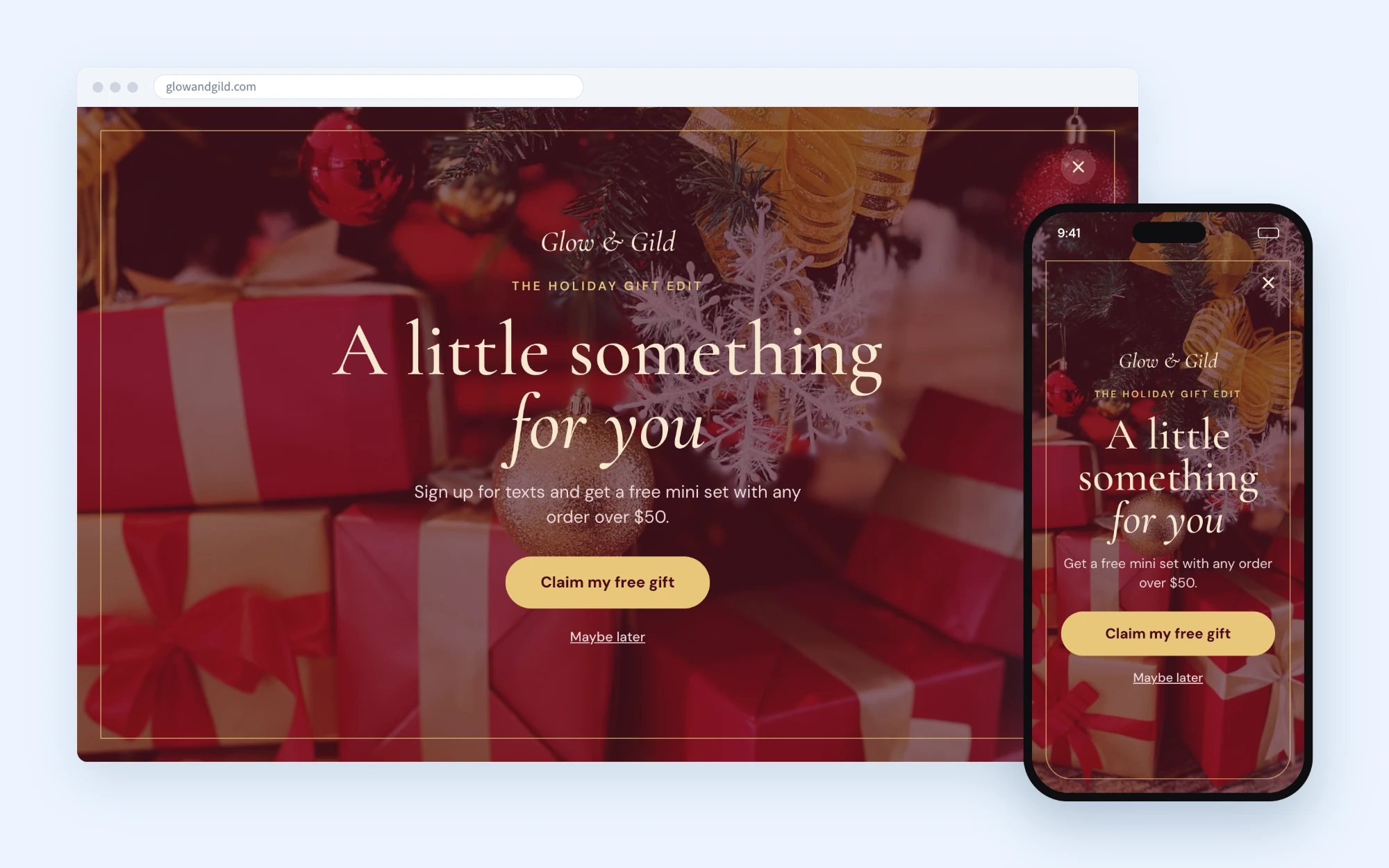
#### 2. Gift with purchase
**Design:** Rich festive colours, a thin border and an elegant font make the offer feel like a gift. Give a free item instead of a discount - it protects your margins after BFCM.
**Headlines to try:**
* A little something for you
* Your gift is waiting
* A free gift with every order over \[amount]
**Button text to try:** Claim my free gift · Unwrap my gift
#### 3. First holiday order
**Design:** A split layout - product photo on one side, offer on the other - keeps the focus on what you sell. Tell shoppers what they'll get by text, for example a heads-up before your Christmas products sell out.
**Headlines to try:**
* \[15%] off your first holiday order
* \[Season] is here
* Be first to know before we sell out
**Button text to try:** Get my \[15%] off · Count me in
#### 4. Seasonal product drop
**Design:** If you have a limited Christmas collection, build the popup around it. Combine early access with a small fixed amount off, and use a warm photo of the product.
**Headlines to try:**
* Light up the holidays
* Our Christmas collection is here
* Be the first to shop our holiday drop
**Button text to try:** Get \[$10] off · Get early access
{% hint style="info" %}
A soft decline link like "Maybe later" or "No thanks" keeps the popup friendly. Make sure your Welcome Flow's first message matches the offer on the popup.
{% endhint %}
[Create a welcome popup](/list-growth/popups/welcome-popup.md)
[Schedule your opt-in tools](/list-growth/testing-and-scheduling/scheduling-opt-ins.md)
[Customize your CTA button](/list-growth/popups/customizing-your-cta-button-in-popups.md)
### Discount ideas
Shoppers have just been through BFCM. In December, you don't have to beat your BFCM offer - give them something that feels like a gift.
* **Gift with purchase:** a free mini, sample or extra item over a set order value
* **First-order discount:** a percentage or fixed amount off for new subscribers
* **Early access:** let subscribers shop your Christmas collection before everyone else
* **Gift sets and bundles:** ready-made gifts that take the guesswork out of choosing
* **After-Christmas sale:** a sale from 26 December, for shoppers with gift cards and gift money
#### Discount code ideas
Keep codes short - one word or a word and a number - so they're easy to remember and type on a phone.
| Offer | Code ideas |
| --------------------- | ---------------------- |
| First-order discount | MERRY · JOLLY · XMAS15 |
| Gift with purchase | GIFT · MINI · UNWRAP |
| Early access | EARLY · FIRST · PEEK |
| Gift sets and bundles | SET · BUNDLE |
| After-Christmas sale | AFTER · NY10 · CHEERS |
{% hint style="info" %}
For unique and expiring codes, Recart creates a different code for each customer. Use your code idea as the prefix, so every code still reads like your offer.
{% endhint %}
{% hint style="info" %}
Set your Christmas discount to end on Christmas Eve, then start your after-Christmas offer. Expiring discount codes work in popups and Welcome Flows, but not in campaigns - for campaigns, use fixed start and end dates.
{% endhint %}
[Create and manage discount codes](/discounts/create-discount-codes-in-recart.md)
[Expiring discount codes](/discounts/expiring-discount-codes.md)
### Recart setup checklist
1. Create your Christmas discount (and your after-Christmas discount), with start and end dates
2. Build your Christmas popup and schedule it to start when your BFCM popup ends
3. Update your Welcome Flow's first message to match the popup offer
4. Plan your shipping messages with the [Last-Minute Holiday Gifting](/holiday-playbooks/holiday-shipping-and-last-minute-gifting.md) playbook
5. Schedule your campaigns
6. Send yourself test messages before anything goes live
[Test Recart SMS messages](/sms/getting-started/test-recart-sms-messages.md)
If you need help planning your Christmas sends, [contact the Recart Support team](/contact-recart-support.md). We'd be happy to help!
---
# Agent Instructions
This documentation is published with GitBook. GitBook is the documentation platform designed so that both humans and AI agents can read, navigate, and reason over technical content effectively. Learn more at gitbook.com.
## Querying This Documentation
If you need additional information that is not directly available in this page, you can query the documentation by asking a question.
Perform an HTTP GET request on the following URL with the `ask` and `goal` query parameters:
```
GET https://help.recart.com/holiday-playbooks/christmas.md?ask=&goal=
```
`ask` is the immediate question: it should be specific, self-contained, and written in natural language.
`goal` is what the user is ultimately trying to achieve, the reason they need the answer. Sharing it helps GitBook give you a better, more relevant answer. A goal is most helpful when it describes the outcome the user wants rather than restating the question. For example, with `ask=how do I create an API token`, a goal like `automate deployments from our CI pipeline` lets GitBook tailor the answer to that use case.
The response will contain a direct answer to the question and relevant excerpts and sources from the documentation.
Use this mechanism when the answer is not explicitly present in the current page, you need clarification or additional context, or you want to retrieve related documentation sections.