> For the complete documentation index, see [llms.txt](https://help.recart.com/llms.txt). Markdown versions of documentation pages are available by appending `.md` to page URLs; this page is available as [Markdown](https://help.recart.com/list-growth/other-opt-in-tools/opt-in-tools-sms-keywords.md).
# Opt-in Tools - SMS Keywords
Explains how customers can subscribe by texting a keyword to your number from any online or offline channel.
The SMS Keyword Opt-in Tool allows customers to subscribe to your SMS list by texting a specific keyword to your number. It’s a simple and effective way to grow your subscriber list using both online and offline channels.
You can promote keywords anywhere - on your website, social media, emails, ads, packaging, or in-store materials - making it easy for customers to opt in from anywhere.
### How to create a new Keyword
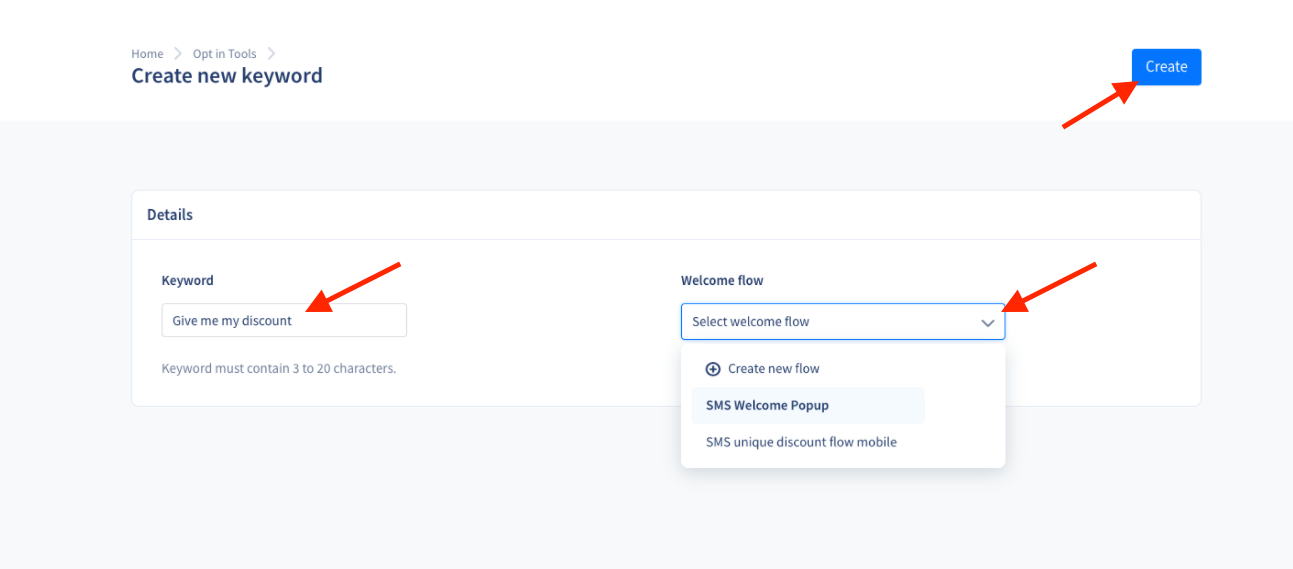
1. Go to [**Opt-in Tools**](https://app.recart.com/optin-tools) in your Recart dashboard.
2. Click **Create New** and select **Keyword.**
3. Add your keyword or expression to the Keyword field.
* This will be the text people need to send to your number to opt in.
* This will also be the name of your keyword opt-in tool.
4. Attach a welcome message
* You can select an existing welcome message
* Or you can create a new welcome message separately for the keyword
5. Click **Create** to save.
Once created, your keyword will appear on the Opt-in Tools Page. You can **activate**, **deactivate** and **edit** it by clicking on the three (...) dots next to it.

### Keyword Rules & Limitations
To ensure your SMS Keyword Opt-in works correctly and remains compliant, keywords must follow these rules:
* Keywords must be between 3 and 20 characters long, can be one word or more.
* Only letters (A–Z) and numbers (0–9) are supported. Special characters, spaces, or symbols (such as ! @ # $ % \_ - /) are not allowed.
* Keywords are not case-sensitive, meaning “SALE”, “sale”, and “Sale” will all trigger the same opt-in.
* Each keyword must be unique and can only be connected to one opt-in tool at a time.
* Reserved system keywords such as *STOP*, *HELP*, *UNSTOP*, and *UNSUBSCRIBE* cannot be used, as they are required for compliance and opt-out handling.
Please note:
* Once a keyword is created, it cannot be edited or renamed. If you need to change the keyword text, you’ll need to create a new Keyword Opt-in Tool.
* Keywords will only collect subscribers if both the Keyword Opt-in Tool and the connected Welcome Message are active. If either is inactive, new subscribers will not be added.
Keywords sent with special characters such as ?, !, -, etc will be recognized and will subscribe the user to your list.
On the same page, you will be able to track how many people subscribed to your list via the keyword opt-in tool in the [Subscriptions](https://app.recart.com/subscribers) column.
If you click on the keyword you can modify the attached welcome message, on the other hand, you will not be able to modify the keyword’s name. You will also find our recommendations about sharing your keyword on this page.
### Stay compliant when advertising your Keywords
Text marketing legal requirements apply to keyword-type opt-in tools as well!
**Make sure you add the compliance language that informs your audience they are opting-in to text messages from your store disclaimer on every channel you advertise your keywords, including online and offline.**
Copy the below text and replace *\[STORE NAME]* with your brand’s name.
*By texting, you agree to receive recurring automated promotional and personalized marketing text messages (e.g. cart reminders) from \[STORE NAME] at the cell number used when signing up. Consent is not a condition of any purchase. Reply HELP for help and STOP to cancel. Msg frequency varies. Std Msg & data rates may apply. View our Privacy Policy and Terms of Service.*
Please note that in case you can not link your Privacy Policy and Terms of Service, you are supposed to add the URLs that direct to these documents.
#### Examples
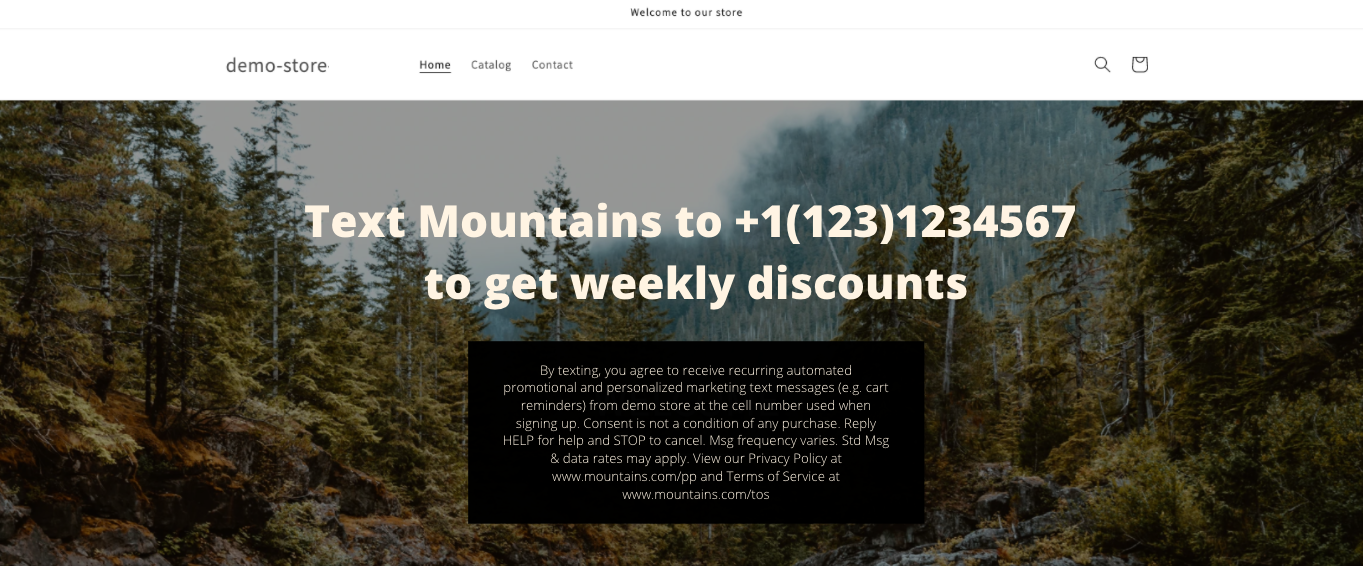
Website banners or email newsletter banners:
Social media, posts, cover pictures, stories:

Printed flyers, posters, business cards:

{% hint style="success" %}
**Pro tip:** Create separate keywords and welcome messages for each platform or campaign where you collect subscribers with this type of tool. Only this way you will have accurate statistics! In case your keywords are advertised on multiple platforms, we will not be able to display statistics separately.
{% endhint %}
### Using Keywords for Targeting
Subscribers who join through a keyword can be segmented and targeted based on that opt-in source. This allows you to send more relevant, personalized campaigns to specific groups of subscribers.
If you have any questions, do not hesitate to [contact the Recart Support team.](/contact-recart-support.md) We'd be happy to help!
---
# Agent Instructions
This documentation is published with GitBook. GitBook is the documentation platform designed so that both humans and AI agents can read, navigate, and reason over technical content effectively. Learn more at gitbook.com.
## Querying This Documentation
If you need additional information that is not directly available in this page, you can query the documentation by asking a question.
Perform an HTTP GET request on the following URL with the `ask` and `goal` query parameters:
```
GET https://help.recart.com/list-growth/other-opt-in-tools/opt-in-tools-sms-keywords.md?ask=&goal=
```
`ask` is the immediate question: it should be specific, self-contained, and written in natural language.
`goal` is what the user is ultimately trying to achieve, the reason they need the answer. Sharing it helps GitBook give you a better, more relevant answer. A goal is most helpful when it describes the outcome the user wants rather than restating the question. For example, with `ask=how do I create an API token`, a goal like `automate deployments from our CI pipeline` lets GitBook tailor the answer to that use case.
The response will contain a direct answer to the question and relevant excerpts and sources from the documentation.
Use this mechanism when the answer is not explicitly present in the current page, you need clarification or additional context, or you want to retrieve related documentation sections.