> For the complete documentation index, see [llms.txt](https://help.recart.com/llms.txt). Markdown versions of documentation pages are available by appending `.md` to page URLs; this page is available as [Markdown](https://help.recart.com/list-growth/popups/target-popups-by-klaviyo-segment.md).
# Target Popups by Klaviyo Segment
Show a popup only to visitors who are in a Klaviyo segment you choose, so each audience sees a message that fits them.
If your Klaviyo account is connected to Recart, you can show a popup only to visitors who are in a Klaviyo segment you pick. You build the audience in Klaviyo, and Recart checks whether each visitor is in it before the popup appears.
This is an option inside [Visitor Targeting](/list-growth/popups/visitor-targeting.md), in the popup editor's **Settings**.
### What you can do with it
* Show **Download our app** only to people who don't have your app yet
* Show **Join the club** only to customers who aren't members yet
* Show **New arrivals** or **early access** only to existing members or VIPs
Any audience you can build as a segment in Klaviyo can get its own popup.
### Before you start
* Your [Klaviyo integration](/integrations/email-and-sms-platforms/klaviyo-recart-integration.md) must be connected and **Active** on the Integrations page
* The segment must exist in Klaviyo - the dropdown in the popup editor shows your Klaviyo segments automatically
#### Key terms
* **Klaviyo profile** — a contact stored in your Klaviyo account, one per person, identified by email, phone number or external ID. People who unsubscribed or are suppressed are still profiles
* **Recognized visitor** — a visitor Recart can match to a Klaviyo profile. Recart uses Klaviyo's own browser cookie for this, so segment targeting only works for visitors whose browser Klaviyo already knows
### Set it up
1. Create the segment in Klaviyo, for example "Not Mobile App User"
2. In Recart, open the popup in the editor and go to **Settings**
3. Under **Visitor targeting**, turn on **Show to specific visitors only**
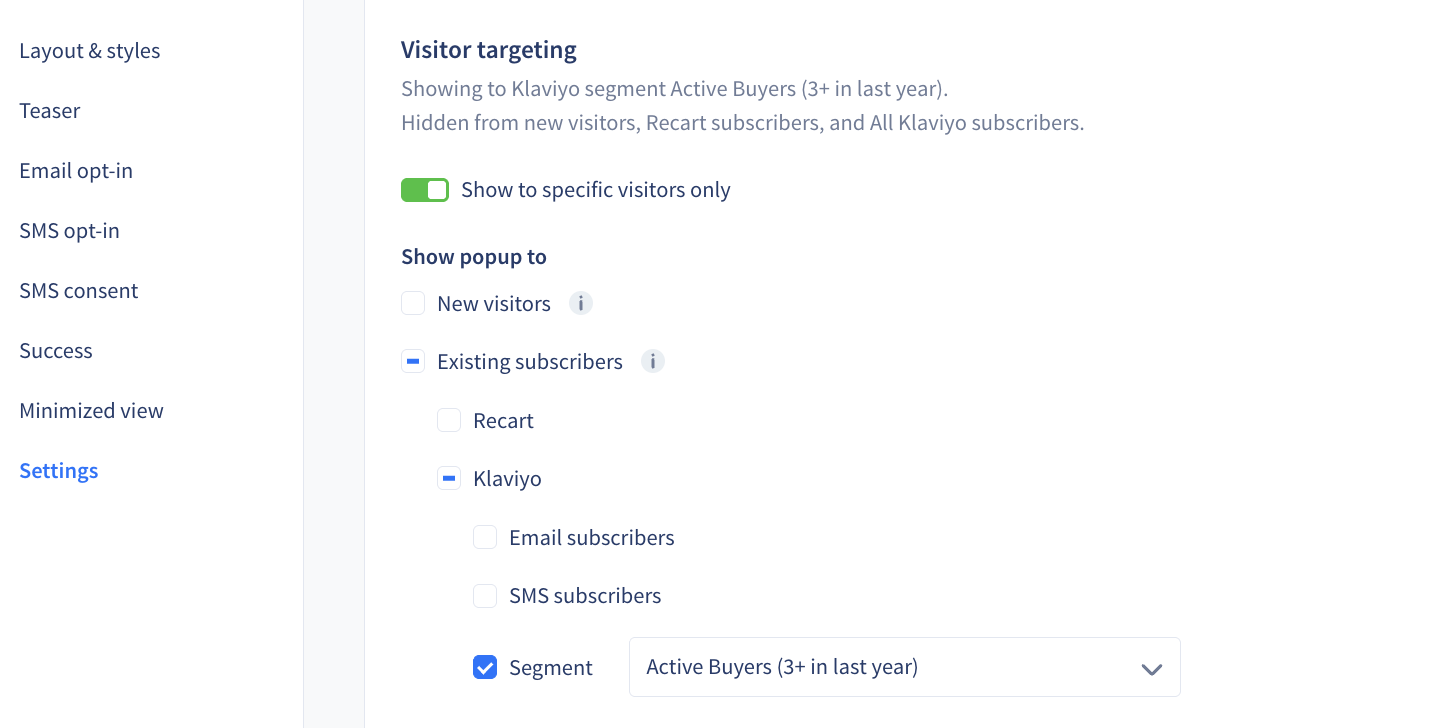
4. Under **Show popup to**, go to **Existing subscribers** → **Klaviyo** and tick **Segment**
5. Pick your segment from the dropdown next to it. You can search the list
6. Untick any other visitor groups you don't want this popup to reach, then save
{% hint style="info" %}
The **Segment** box is off by default, even when Visitor Targeting is on and every other box is ticked. Once you tick it, you must pick a segment before you can save.
{% endhint %}
Each popup can target **one** segment. Duplicating a popup copies its targeting, including the segment.
{% hint style="info" %}
**Tip:** the line under **Visitor targeting** sums up your choice, for example "Showing to Klaviyo segment Active Buyers. Hidden from new visitors, Recart subscribers…". Read it before you save to check the popup reaches the right people.
{% endhint %}
### How it works
1. A visitor lands on your store
2. Recart reads Klaviyo's browser cookie to find out which Klaviyo profile the visitor is
3. Before the popup appears, Recart asks Klaviyo whether that profile is in your segment
4. **In the segment** → the popup can show. **Not in the segment, or Recart can't tell** → the popup stays hidden
Subscription status doesn't matter for segment targeting. Being in the segment is enough, even for profiles that have unsubscribed.
### How the ticked boxes combine
Ticked boxes combine with **OR**: a visitor only needs to match one of them to see the popup.
| Ticked boxes | Who sees the popup |
| ------------------------------------------- | ------------------------------------------------------------------------------------------------- |
| **Segment** only | Recognized Klaviyo profiles in the segment, subscribed or not |
| **Email subscribers** + **SMS subscribers** | Recognized Klaviyo profiles with an active email OR SMS subscription. Segments aren't checked |
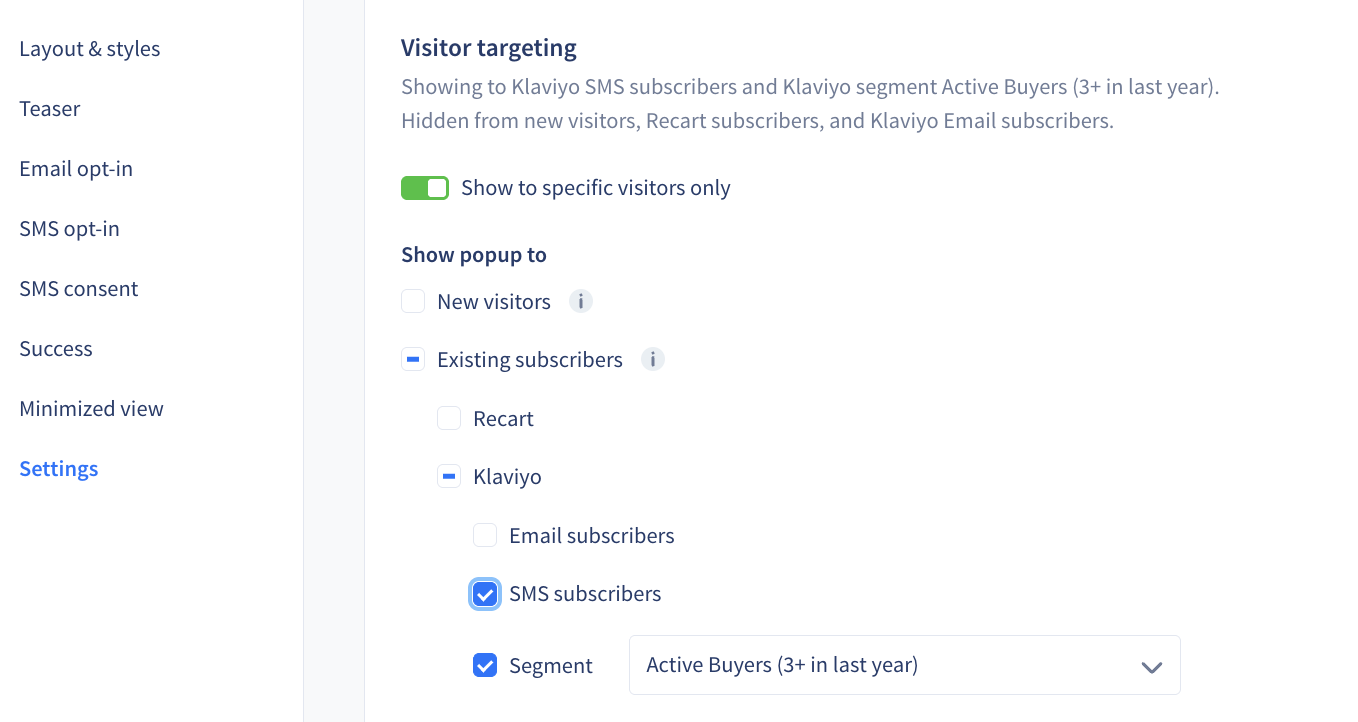
| **SMS subscribers** + **Segment** | Active SMS subscribers OR segment members — so it also reaches people with no active subscription |
There's no AND and no "not in segment" option. If you need an audience like "VIPs who haven't downloaded the app", build it as one segment in Klaviyo and target that.
#### Segment only
#### Email subscribers + SMS subscribers
#### SMS subscribers + Segment
### How it works with your New visitors popup
**New visitors** isn't a fixed group. It means everyone who isn't matched by any **other active** popup that has Visitor Targeting turned on. It updates by itself when you add or remove targeted popups.
| Your other active targeted popups | Who sees the New visitors popup |
| ------------------------------------------------------- | ------------------------------------------------------------------------------------------------------------ |
| Email subscribers, SMS subscribers, Segment A | Visitors who are **not** active email subscribers, **not** active SMS subscribers and **not** in Segment A |
| Segment A, Segment B, Segment C | Visitors who are in **none** of A, B or C |
| Segment A, B and C, then you remove the Segment C popup | Visitors who are in neither A nor B. Members of C now see the New visitors popup — you don't need to edit it |
### Good to know
* **Only recognized visitors can be matched.** If a visitor is on a new device, has cleared their cookies or declined your cookie consent banner, Recart can't check their segment, so the segment popup stays hidden for them
* **Overlapping segments.** If someone is in two segments and each segment has its own popup, both popups can qualify. There's no priority setting for targeting; your normal popup order decides which one shows. Keep segments that have their own popups from overlapping in Klaviyo to avoid this
If you have any questions, do not hesitate to [contact the Recart Support team.](/contact-recart-support.md) We'd be happy to help!
---
# Agent Instructions
This documentation is published with GitBook. GitBook is the documentation platform designed so that both humans and AI agents can read, navigate, and reason over technical content effectively. Learn more at gitbook.com.
## Querying This Documentation
If you need additional information that is not directly available in this page, you can query the documentation by asking a question.
Perform an HTTP GET request on the following URL with the `ask` and `goal` query parameters:
```
GET https://help.recart.com/list-growth/popups/target-popups-by-klaviyo-segment.md?ask=&goal=
```
`ask` is the immediate question: it should be specific, self-contained, and written in natural language.
`goal` is what the user is ultimately trying to achieve, the reason they need the answer. Sharing it helps GitBook give you a better, more relevant answer. A goal is most helpful when it describes the outcome the user wants rather than restating the question. For example, with `ask=how do I create an API token`, a goal like `automate deployments from our CI pipeline` lets GitBook tailor the answer to that use case.
The response will contain a direct answer to the question and relevant excerpts and sources from the documentation.
Use this mechanism when the answer is not explicitly present in the current page, you need clarification or additional context, or you want to retrieve related documentation sections.