> For the complete documentation index, see [llms.txt](https://help.recart.com/llms.txt). Markdown versions of documentation pages are available by appending `.md` to page URLs; this page is available as [Markdown](https://help.recart.com/sms/automated-flows/abandonment-flows.md).
# Automated Flows - SMS Abandonment
Covers the three abandonment flow types, browse, cart, and checkout, that target subscribers already showing interest.
Turning on abandonment flows is one of the easiest and strongest ways to generate SMS revenue.
***
### What are abandonment flows?
Abandonment flows are targeted messages that are sent to customers who have already demonstrated some level of interest in your products. As these are lower sales funnel activities, your average conversion and engagement levels will always be higher than one-time promotions.
You can set up these SMS Flows to go to potential customers who have abandoned your site at various stages before purchase.
This category is subdivided into three types of abandonment:
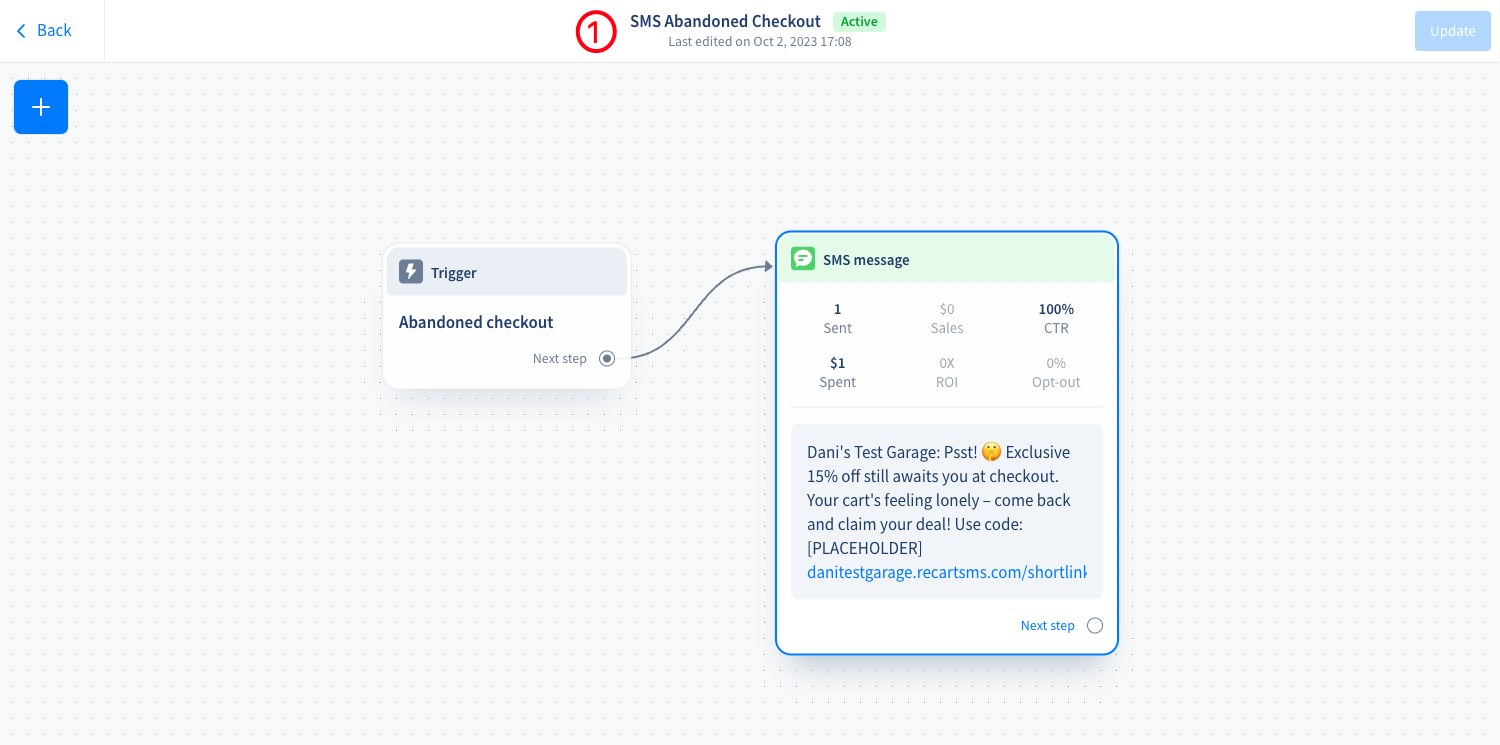
1. Abandoned Checkout
2. Browse Abandonment
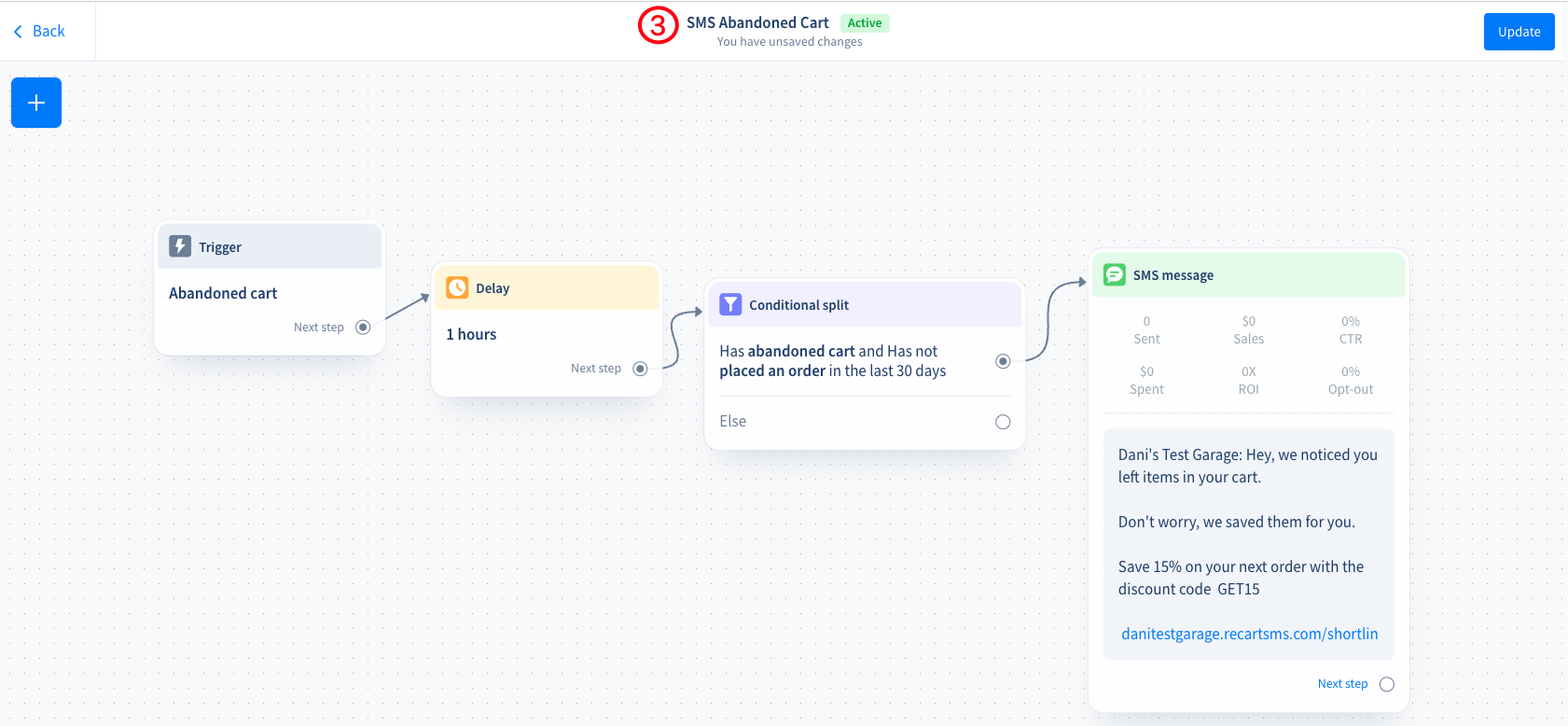
3. Abandoned Cart
Each type has its own dedicated flow for better targeting and conversion.
We highly encourage for our merchants to turn on all 3 abandonment flows as each targets a different shopping stage.
The conditions are set so that the customer will always receive the lowest funnel stage they left their shopping at. They will not receive multiple abandonment flows for the same shopping attempt.
### Where can I access SMS abandonment flows?
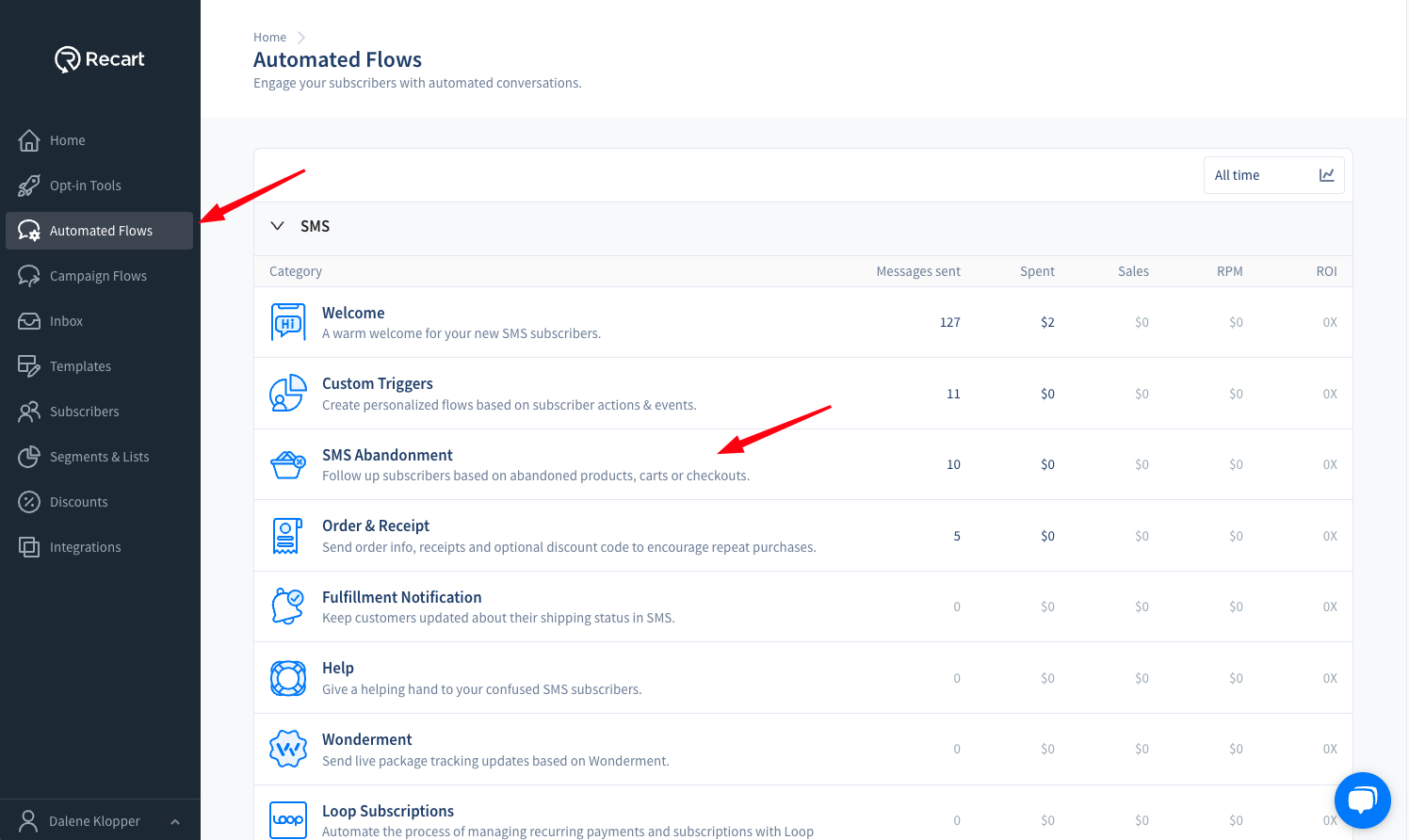
You can follow these easy steps to access your SMS abandonment flows:
1. Under your “Home” page, click on “Automated Flows”.
2. Select “SMS Abandonment”.
3. Here you will be able to access all three abandonment flows.
### When are abandoned flows triggered?
Abandonment messages are triggered 10-15 minutes after the actual abandonment. Please note this delay as you potentially add additional time to the delay trigger.
The actions behind the triggers differ for each abandonment scenario.
### How often subscribers receive abandonment messages
A subscriber receives at most one abandonment message every 48 hours, across the browse, cart and checkout flows together.
* If a subscriber received an abandonment message in the last 48 hours, their next abandonment doesn't send. Once 48 hours have passed, they can receive one again
* This applies to every abandonment, whichever flow it comes from
* The flow hierarchy hasn't changed: a subscriber still receives only the lowest funnel stage they reached — checkout over cart over browse
* The delays and conditions you set in the flow editor, Quiet Hours and Smart Sending all still apply on top
48 hours is the default, and there's no setting for it in the dashboard. If you'd like a different window for your store, contact the Recart Support team.
### Returning subscribers are recognized
On Shopify stores, Recart now recognizes your subscribers when they come back to your store, even on a new visit weeks later. If they abandon, they receive your abandonment flows. Before, these shoppers were missed unless they subscribed again. See [How Recart Recognizes Returning Visitors](/general/how-recart-recognizes-returning-visitors-recart-pixel.md) for details.
* **Expect more abandonment messages.** In test stores, this meant about 40% more browse abandonment messages. Each subscriber still receives at most one every 48 hours
* **No setup needed.** It's switched on for every account
* **Shared devices are skipped.** If two different subscribers have used the same browser, no abandonment message is sent, so a message never goes to the wrong person
* **Revenue is attributed as usual.** Orders that follow these messages count toward the flow's revenue
* **Shopify only.** Returning-subscriber recognition isn't available on other ecommerce platforms
### Abandoned Checkout
#### What is abandoned checkout?
Abandoned checkout occurs when a potential customer enters their delivery details on the checkout page but does not complete the purchase. This stage is distinct from an abandoned cart, where the customer has not yet entered any delivery information or has not even reached the checkout page.
#### Abandoned checkout flow
The abandoned checkout flow is designed specifically to re-engage customers who have provided their contact details but have not finalized their purchase. This flow includes automated SMS reminders to encourage the completion of the purchase.
### Browse Abandonment
#### What is browse abandonment?
Browse abandonment occurs when a potential customer visits a certain product page without adding to the cart or checking out.
#### Browse abandonment flow
Utilizing the Browse Abandonment flow you can remind your subscribers of items they checked and did not purchase. Target them with exclusive follow-ups, further discounts based on their interests, or useful product knowledge that can help encourage them to order.
#### Browse abandonment flow sending rules
* A subscriber receives at most one abandonment message every 48 hours, across all abandonment flows — see [How often subscribers receive abandonment messages](/sms/automated-flows/abandonment-flows.md#how-often-subscribers-receive-abandonment-messages)
* Even if the subscriber checked multiple products, they will only receive the product name and the URL of the product they last visited during their browsing session
* Revisiting the store during the timeframe of the delay will abort triggering the Browse Abandonment flow
* Placing items in the cart or purchasing will also block triggering the Browse Abandonment flow
* The sending of the Browse Abandonment flow will be postponed if the subscriber is in Quiet Hours
### Abandoned Cart
#### What is an “abandoned cart”?
An abandoned cart occurs when a potential customer adds a product to their cart but does not complete the purchase. The definition of "Abandoned Cart" includes scenarios where the customer has items in their cart without ever visiting the checkout page, or if they have only filled out their contact details in checkout (and not their delivery details), making it distinct from “Abandoned Checkout”.
#### Abandoned cart flow
The abandoned cart flow is designed specifically to re-engage customers who have not finalized their purchase. This flow includes automated SMS reminders that include further discounts to encourage the completion of the purchase.
If you have any questions, do not hesitate to [contact the Recart Support team.](/contact-recart-support.md) We'd be happy to help!
---
# Agent Instructions
This documentation is published with GitBook. GitBook is the documentation platform designed so that both humans and AI agents can read, navigate, and reason over technical content effectively. Learn more at gitbook.com.
## Querying This Documentation
If you need additional information that is not directly available in this page, you can query the documentation by asking a question.
Perform an HTTP GET request on the following URL with the `ask` and `goal` query parameters:
```
GET https://help.recart.com/sms/automated-flows/abandonment-flows.md?ask=&goal=
```
`ask` is the immediate question: it should be specific, self-contained, and written in natural language.
`goal` is what the user is ultimately trying to achieve, the reason they need the answer. Sharing it helps GitBook give you a better, more relevant answer. A goal is most helpful when it describes the outcome the user wants rather than restating the question. For example, with `ask=how do I create an API token`, a goal like `automate deployments from our CI pipeline` lets GitBook tailor the answer to that use case.
The response will contain a direct answer to the question and relevant excerpts and sources from the documentation.
Use this mechanism when the answer is not explicitly present in the current page, you need clarification or additional context, or you want to retrieve related documentation sections.