> For the complete documentation index, see [llms.txt](https://help.recart.com/llms.txt). Markdown versions of documentation pages are available by appending `.md` to page URLs; this page is available as [Markdown](https://help.recart.com/sms/getting-started/test-recart-sms-messages.md).
# Test Recart SMS Messages
Shows how to send yourself test messages to check links, discount codes, images, and formatting before going live.
Test Recart SMS Messages Use this guide to preview your SMS messages before sending them so you can verify links, discount codes, and formatting.
### What You Can Test
Before activating an automated flow or campaign, you can send test messages to verify:
* Links work correctly
* Discount codes display properly
* Images and attachments load (for MMS messages)
* Message formatting looks right on mobile devices
### Before You Begin
* Test messages can only be sent to US and Canadian phone numbers (plus American Samoa, Guam, Northern Mariana Islands, Virgin Islands, and Puerto Rico)
* You can send tests to up to 5 phone numbers at a time
* Phone numbers must be entered without spaces or special characters
### Send a Test Message
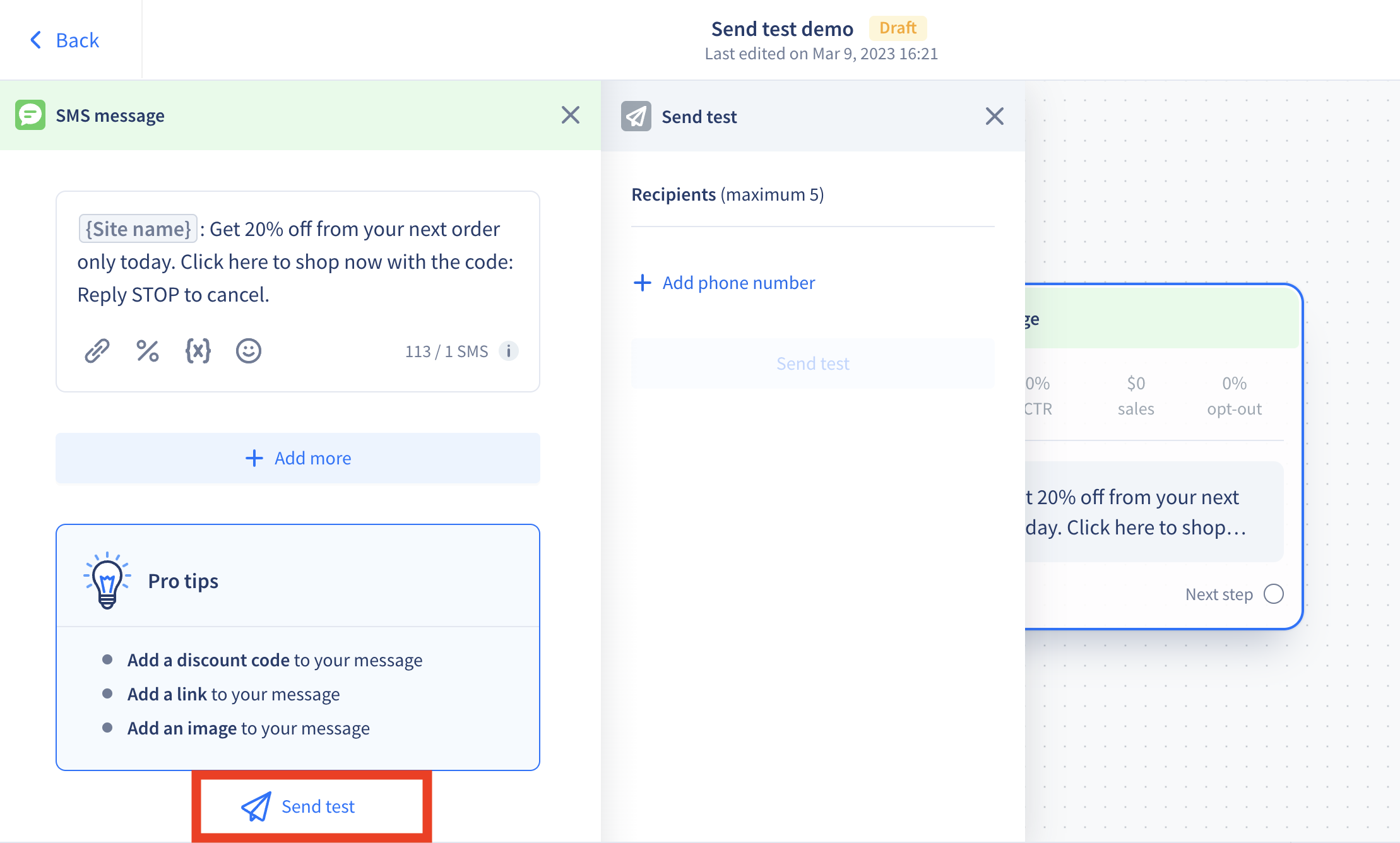
1. Open the automated flow or campaign you want to test.
2. Click on the **message step** you want to preview.
3. At the bottom of the editor panel, click **Send test** (paper plane icon).
4. Enter a phone number in the required format (no spaces).
5. Click **Send test**.
The test message arrives within seconds. Recart saves your number for future tests, you can change it anytime.
{% hint style="info" %}
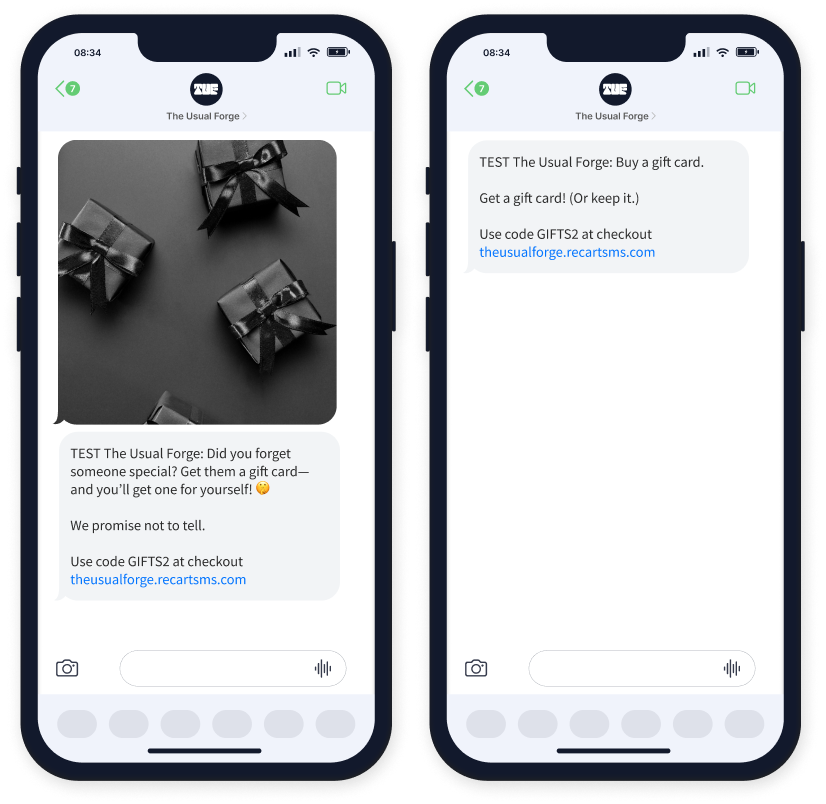
**Note:** All test messages include "TEST" before your business name so you can easily identify them.
{% endhint %}
### Testing from Outside the US or Canada
If you're located outside the US or Canada, you have two options:
* **Purchase a US SIM card** for your mobile device
* **Use a virtual SMS number** through a service like [Toky](https://toky.co/en/features/phone-numbers)
### Things to Know
| Detail | What It Means |
| ------------------------------- | ---------------------------------------------------------------- |
| **Cost** | Test messages are free—no charge to your account |
| **Statistics** | Test messages don't appear in your flow or campaign stats |
| **Subscriber list** | Numbers that receive tests are not added to your subscriber list |
| **Quiet Hours & Smart Sending** | These settings don't apply to tests—messages send immediately |
| **"TEST" prefix** | All test messages show "TEST" before your business name |
### Best Practices
* **Recommended:** Test every flow and campaign before activating, especially if they include discount codes or time-sensitive links.
* **Recommended:** Test on multiple devices if possible to check formatting across different phones.
* **Recommended:** Verify that links open correctly and land on the right pages.
* **Avoid:** Assuming a message looks the same on all devices, always preview on an actual phone.
If you have any questions, do not hesitate to [contact the Recart Support team.](/contact-recart-support.md) We'd be happy to help!
---
# Agent Instructions
This documentation is published with GitBook. GitBook is the documentation platform designed so that both humans and AI agents can read, navigate, and reason over technical content effectively. Learn more at gitbook.com.
## Querying This Documentation
If you need additional information that is not directly available in this page, you can query the documentation by asking a question.
Perform an HTTP GET request on the following URL with the `ask` and `goal` query parameters:
```
GET https://help.recart.com/sms/getting-started/test-recart-sms-messages.md?ask=&goal=
```
`ask` is the immediate question: it should be specific, self-contained, and written in natural language.
`goal` is what the user is ultimately trying to achieve, the reason they need the answer. Sharing it helps GitBook give you a better, more relevant answer. A goal is most helpful when it describes the outcome the user wants rather than restating the question. For example, with `ask=how do I create an API token`, a goal like `automate deployments from our CI pipeline` lets GitBook tailor the answer to that use case.
The response will contain a direct answer to the question and relevant excerpts and sources from the documentation.
Use this mechanism when the answer is not explicitly present in the current page, you need clarification or additional context, or you want to retrieve related documentation sections.
 ### Best Practices
* **Recommended:** Test every flow and campaign before activating, especially if they include discount codes or time-sensitive links.
* **Recommended:** Test on multiple devices if possible to check formatting across different phones.
* **Recommended:** Verify that links open correctly and land on the right pages.
* **Avoid:** Assuming a message looks the same on all devices, always preview on an actual phone.
If you have any questions, do not hesitate to [contact the Recart Support team.](/contact-recart-support.md) We'd be happy to help!
---
# Agent Instructions
This documentation is published with GitBook. GitBook is the documentation platform designed so that both humans and AI agents can read, navigate, and reason over technical content effectively. Learn more at gitbook.com.
## Querying This Documentation
If you need additional information that is not directly available in this page, you can query the documentation by asking a question.
Perform an HTTP GET request on the following URL with the `ask` and `goal` query parameters:
```
GET https://help.recart.com/sms/getting-started/test-recart-sms-messages.md?ask=
### Best Practices
* **Recommended:** Test every flow and campaign before activating, especially if they include discount codes or time-sensitive links.
* **Recommended:** Test on multiple devices if possible to check formatting across different phones.
* **Recommended:** Verify that links open correctly and land on the right pages.
* **Avoid:** Assuming a message looks the same on all devices, always preview on an actual phone.
If you have any questions, do not hesitate to [contact the Recart Support team.](/contact-recart-support.md) We'd be happy to help!
---
# Agent Instructions
This documentation is published with GitBook. GitBook is the documentation platform designed so that both humans and AI agents can read, navigate, and reason over technical content effectively. Learn more at gitbook.com.
## Querying This Documentation
If you need additional information that is not directly available in this page, you can query the documentation by asking a question.
Perform an HTTP GET request on the following URL with the `ask` and `goal` query parameters:
```
GET https://help.recart.com/sms/getting-started/test-recart-sms-messages.md?ask=