> For the complete documentation index, see [llms.txt](https://help.recart.com/llms.txt). Markdown versions of documentation pages are available by appending `.md` to page URLs; this page is available as [Markdown](https://help.recart.com/sms/unsubscribe-or-resubscribe-sms-subscribers.md).
# Unsubscribe or Resubscribe SMS Subscribers
Explains how subscribers can opt out of your text list and the opt-out language your messages need.
Learn how users can get unsubscribed from your text marketing list.
In order to comply with SMS marketing rules, you need to have a clear Opt-out language in most of your messages. Certain carriers recommend providing explicit opt-out instructions in every fifth message. Eg.: Reply STOP to opt-out.
This way you provide the option to your users to opt out anytime they want to.
### How Subscribers Get Unsubscribed
There are three ways a subscriber can be removed from your SMS list in Recart:
1. The subscriber replies with an unsubscribe keyword
2. You unsubscribe them manually from their profile
3. Recart's Automated List Cleaning removes them automatically
Once unsubscribed — regardless of method — all automated flows, campaigns, and manual messages are blocked from being sent to that subscriber.
### 1. Subscribers can opt out of text lists by replying with specific keywords:
* **stop**: the user will be unsubscribed immediately and will receive an Unsubscribe message. This message can not be edited in Recart because it is sent by our aggregator.
* **unsubscribe, unsub, end, quit, stop messaging, f✮ck off, cancel send, unsubscribe!, unsubscribe!!, unsubscribe!!!, unsubscribe!!!!, unsubscribe!!!!!, stop messaging, stop messages, stop all messages:** the user will be unsubscribed immediately, but will NOT receive the Unsubscribe message. Our aggregator will not handle it in these cases, we will soon implement Recart’s own Unsubscribe text message though
* Starting in February 2024, subscribers will be automatically unsubscribed if their message **begins** with an unsubscribe keyword. Previously, only exact match keywords triggered an unsubscribe, but now, messages such as “STOP messaging” or “QUIT now” will also unsubscribe the user. This change improves compliance and aligns with industry standards.
#### AI-Powered Unsubscribe Detection
Recart also detects unsubscribe intent in free-text replies that don't use a standard keyword. When a subscriber sends a message like *"please stop texting me"* or *"I don't want these anymore,"* Recart automatically processes the unsubscribe — the result is identical to a STOP keyword.
**Recognised as opt-outs:**
* Natural language phrases (*"remove me," "I don't want this," "please stop texting me"*)
* Stop-related emojis (🛑, ✋, 🚫)
* Common misspellings (*"cease all," "Dtop"*)
**Not treated as opt-outs:**
* Short conversational replies (*"Y," "Yes," "No," "Thanks"*)
* Automated carrier responses
* Number-only messages
You can turn this feature on or off from **Settings → SMS tab**.
#### What happens after an unsubscribe keyword is sent:
The confirmation message a subscriber receives depends on the number type used:
| Number Type | Who Handles It | Confirmation Message |
| ------------------------------------ | ---------------- | -------------------------------------------------------------------------------------------------------------------------------------- |
| **Toll-Free Number (TFN)** | Network provider | Standard carrier opt-out confirmation |
| **Shortcode or 2-Way International** | Recart | *"{SiteName}: You have successfully unsubscribed. No more messages will be sent. Reply RESUBSCRIBE, UNSTOP, or START to resubscribe."* |
When a subscriber texts STOP, the carrier blocks all messages from your number at the network level. A popup re-opt-in alone will not override this block. The subscriber must first text **START** or **UNSTOP** to lift the carrier block before they can receive messages again, even if they re-subscribe through your website.
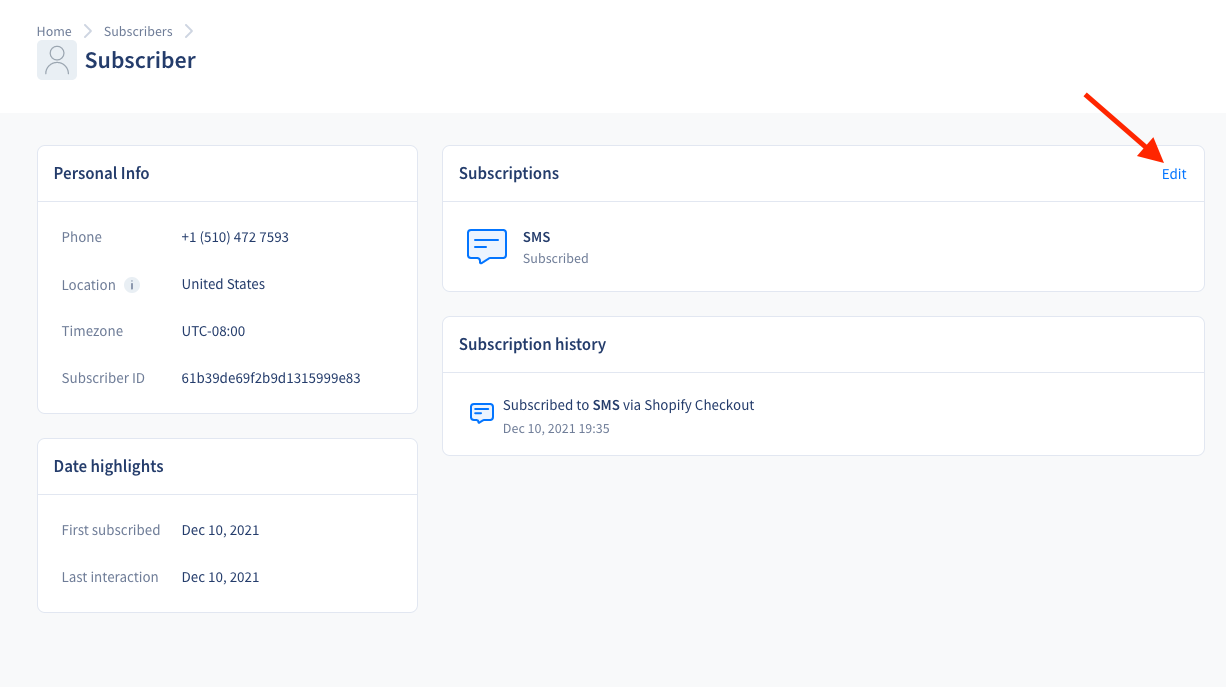
### 2. Unsubscribe users manually on their page:
You can unsubscribe a subscriber directly from their profile on the [Subscribers page](https://app.recart.com/subscribers).
**To manually unsubscribe a subscriber:**
1. Go to the [Subscribers page](https://app.recart.com/subscribers) and find the subscriber
2. Click their name to open their profile
3. Click **Edit**
4. Select **Unsubscribe**
5. Click **Done**
Once unsubscribed, the subscriber will not receive any further messages from Recart.
### 3. Automated List Cleaning
Recart automatically unsubscribes certain subscribers daily as part of Automated List Cleaning. This runs in the background for all merchants and requires no setup.
Subscribers are automatically removed if they fall into any of the following categories:
| Category | Reason for Removal |
| ------------------------------------ | ---------------------------------------------------------------------------- |
| **Deactivated numbers** | Number disconnected or no longer in service, confirmed via carrier data |
| **Known TCPA litigators** | Number flagged in a third-party litigator database — high legal risk |
| **Landlines or unavailable numbers** | Numbers that cannot physically receive SMS messages |
| **Reassigned numbers (Maine)** | Numbers identified as reassigned to a new owner — consent is no longer valid |
**What happens when a subscriber is auto-cleaned:**
* Their SMS subscription is removed
* Their subscriber profile and data are fully preserved
* The specific removal reason is recorded in their profile's **History** section
* The removal appears in the **List Cleaning** chart on your Subscribers page
**Can Automated List Cleaning be turned off?** No. This feature runs for all merchants and cannot be disabled. It is designed to protect you from wasted spend and compliance risk.
**Can I export the list of cleaned subscribers?** Yes — export is available upon request. Contact to request a report.
### Tracking Opt-out Rates
* To show how many users opted out of your list after certain messages we display the opt-out rate in the editor, in the upper right corner of each message.
* The opt-out rate is also displayed on Automated Flows and the SMS Campaigns pages.
* If an Automated flow or a Campaign flow consists of multiple message items, we will display an accumulated opt-out rate considering all messages within the flow. If you would like to see the opt-out rate per message, you need to open the specific flow or campaign
* Once the user opts out from your list, automated and campaign sending will be blocked.
### Resubscribe to SMS messages
Starting in September 2024, resubscription messages do not need to be an exact match. If a user sends a message like “RESUBSCRIBE me for marketing” or “Can I START receiving messages again?”, they will be resubscribed. This improves user experience by making the process more flexible.
* **Toll-Free Numbers (TFN):** The network provider handles START and UNSTOP messages and will process the resubscription.
* **Shortcode & 2-Way International Numbers:** Recart processes these requests and sends the following confirmation message: *”{SiteName}: You have successfully been resubscribed to messages. Reply HELP for help. Reply STOP to unsubscribe. Msg\&Data rates may apply.”*
**Note:** Unsubscribe and resubscribe flows are system-managed and follow strict guidelines:
* **Flows cannot be deactivated** – They must remain active at all times.
* **Flows contain only one message** – Merchants cannot add multiple messages to these flows.
* **Message content is not editable** – Just like legal compliance messages, unsubscribe and resubscribe message text cannot be changed.
* **Flows are auto-created and activated** – For new and reinstalling merchants, these flows will be generated and activated automatically.
**Toll-Free Numbers (TFN)** — If a subscriber texts STOP, the carrier blocks all messages from your number at the network level. A popup opt-in alone will not override this block. The subscriber must first text **START** or **UNSTOP** to lift the carrier block before they can receive messages again, even if they re-subscribe through your popup or website.
### Quiet Hours & Smart Sending:
Unsubscribe and resubscribe flows follow different rules than regular SMS marketing messages:
* Quiet Hours are OFF – Unsubscribe/resubscribe messages are sent immediately, regardless of the time.
* Smart Sending does NOT apply – For unsubscribe messages, smart sending is disabled to ensure no further messages are sent to unsubscribed users.
* Resubscribe Flows bypass Smart Sending – Once a user resubscribes, they will receive the next scheduled marketing message immediately, even if Smart Sending would normally delay it. This ensures users re-enter campaigns without disruption.
**Important Note:** Even if your account is in **Suspended Mode** or has **sending limits during the trial**, unsubscribe and resubscribe messages **will still be sent**. This ensures compliance with opt-in and opt-out regulations.
### Best Practices
* **Required:** Include opt-out language (e.g., "Reply STOP to opt out") regularly in your messages. Certain carriers recommend including it in every fifth message.
* **Required:** Never attempt to re-subscribe a contact who was removed by Automated List Cleaning for litigator or deactivated number reasons.
* **Recommended:** If a subscriber says they stopped receiving messages unexpectedly, check their profile's History section to see if they were auto-cleaned and for what reason.
* **Recommended:** Monitor opt-out rates in the message editor to catch content that may be causing unsubscribes.
* **Avoid:** Trying to manually resubscribe large numbers of auto-cleaned contacts — these are removed for compliance and cost reasons.
If you have any questions, do not hesitate to [contact the Recart Support team.](/contact-recart-support.md) We'd be happy to help!
---
# Agent Instructions
This documentation is published with GitBook. GitBook is the documentation platform designed so that both humans and AI agents can read, navigate, and reason over technical content effectively. Learn more at gitbook.com.
## Querying This Documentation
If you need additional information that is not directly available in this page, you can query the documentation by asking a question.
Perform an HTTP GET request on the following URL with the `ask` and `goal` query parameters:
```
GET https://help.recart.com/sms/unsubscribe-or-resubscribe-sms-subscribers.md?ask=&goal=
```
`ask` is the immediate question: it should be specific, self-contained, and written in natural language.
`goal` is what the user is ultimately trying to achieve, the reason they need the answer. Sharing it helps GitBook give you a better, more relevant answer. A goal is most helpful when it describes the outcome the user wants rather than restating the question. For example, with `ask=how do I create an API token`, a goal like `automate deployments from our CI pipeline` lets GitBook tailor the answer to that use case.
The response will contain a direct answer to the question and relevant excerpts and sources from the documentation.
Use this mechanism when the answer is not explicitly present in the current page, you need clarification or additional context, or you want to retrieve related documentation sections.