
Until now, every visitor saw the same popup regardless of whether they'd already subscribed.
That changes today. Visitor targeting lets you control exactly who sees each popup — based on whether Recart can identify them as a Klaviyo subscriber, a Recart SMS subscriber, or a brand new visitor.
What you can do with it
- Show your welcome discount only to new visitors
- Show a loyalty or winback offer only to existing subscribers
- Run both popups at the same time — each visitor sees only the relevant one
- Exclude Klaviyo email subscribers, Klaviyo SMS subscribers, or Recart subscribers independently
Main use cases
- Parallel popups — run a discount popup for new visitors and a loyalty, upsell, or winback popup for known subscribers simultaneously, with no overlap
- Stop showing popups to visitors who already subscribed — exclude existing subscribers entirely so they never see an acquisition offer again
Visitor targeting works with any trigger type and is fully independent of Pages, Geotargeting, and A/B testing.
Where to find it
Visitor targeting is configured at the individual popup level — find it under Display rules in the popup editor. It's disabled by default, so you turn it on per popup and uncheck the visitor groups you want to exclude.
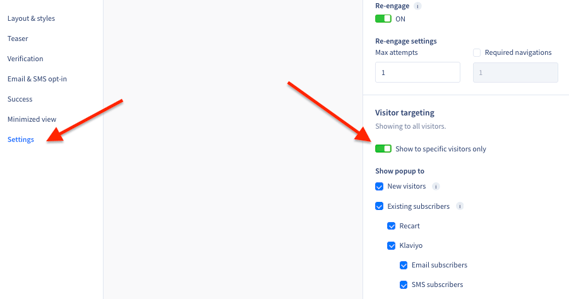
Klaviyo targeting requires an active Klaviyo integration under Settings → Integrations. For more information and the full capabilities of the Klaviyo integration, visit our help article here.
If you have any questions or need support setting up visitor targeting, feel free to reach out to us at support@recart.com — we're happy to help!