
Table of Contents
- What Is an Opt-in Tool?
- Recart Opt-in Tool Types
- Before You Get Started
- Understanding Your Opt-in Statistics
- Managing Your Opt-in Tools
- Learn How to Create Each Opt-in Tool
- Best Practices
- What's Next
What Is an Opt-in Tool?
An opt-in tool is how visitors subscribe to your SMS or email list. These tools appear on your store—as popups, forms, landing pages, or keywords—and collect contact information with proper consent. Once someone subscribes, Recart can send them automated messages and campaigns.
Recart Opt-in Tool Types
Recart offers five types of opt-in tools:
| Tool | Description | Best For |
|---|---|---|
| Popups | Modal windows that appear based on triggers (time, scroll, exit intent) | General list building |
| OneClick Popup | Pre-fills returning visitors' info for one-tap subscription | Returning visitors |
| Landing Pages | Standalone pages dedicated to capturing subscribers | Ads, social links, QR codes |
| Embedded Forms | Forms placed directly in your site content | Footer, blog posts, product pages |
| SMS Keywords | Customers text a keyword to subscribe |
In-store signage, packaging, ads |
You can view and manage all your opt-in tools on the Opt-in Tools page.
Before You Get Started
To ensure a smooth subscriber experience, make sure you always have both a OneClick popup and a regular Welcome popup active at the same time.
- If a visitor clicks “This isn’t me” on the OneClick popup, they will automatically be shown your active Welcome popup to start the opt-in process from scratch.
- If no standard Welcome popup is active, the visitor will not see any opt-in option and will be redirected back to your site without subscribing.
Understanding Your Opt-in Statistics
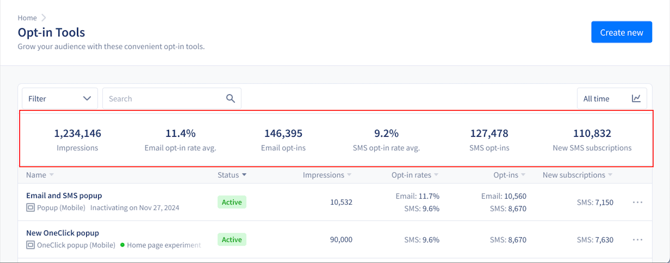
The Opt-in Tools Stats panel shows performance metrics from the previous 30 days, including today.
| Metric | What It Measures |
|---|---|
| Impressions | Total times your opt-in tools were displayed |
| Email Opt-In Rate (Avg.) | % of visitors who entered their email |
| Email Opt-Ins | Total email addresses collected |
| SMS Opt-In Rate (Avg.) | % of visitors who entered their phone number |
| SMS Opt-Ins | Total phone numbers collected |
| New SMS Subscriptions | New phone numbers successfully added to your list |
Managing Your Opt-in Tools
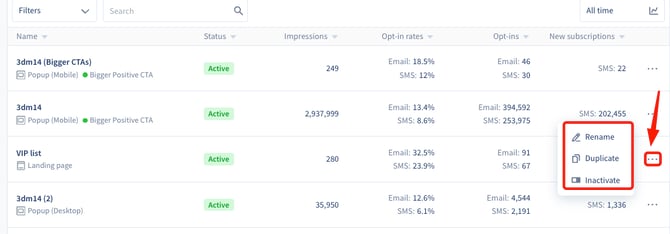
To rename, duplicate, or change status:
Click the three-dot menu next to any opt-in tool.
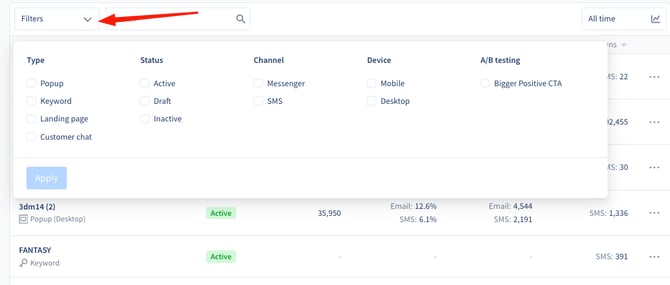
To filter your opt-in tools:
Use the filters at the top to sort by Type, Status, Channel, Device, or A/B testing.
Learn How to Create Each Opt-in Tool
Each tool type has its own editor and setup process. See the dedicated articles below:
Best Practices
- Required: Always keep a Welcome popup active alongside your OneClick popup.
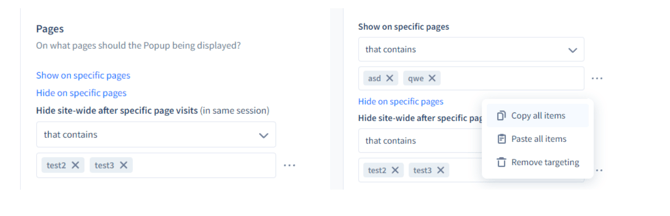
- Recommended: If running multiple popups, set URL targeting rules in the Pages section so they don't overlap or conflict.
- Recommended: Set popups to remain hidden for the session after visitors reach certain URLs (like post-purchase pages).
- Recommended: Use opt-in forms to collect additional subscriber details (like birthday or preferences) via popups or landing pages.
- Recommended: Use Visitor targeting (under Display rules) to show different popups to different visitor groups — a welcome offer for new visitors and a separate message for existing subscribers.
- Recommended: Turn on Re-engage in Trigger settings to give your popup a second chance with visitors who dismissed it but kept browsing.
- Avoid: Running too many popups at once without proper targeting—this creates a poor visitor experience.
What's Next
Once you understand the opt-in tool types, you can:
- Create your first popup to start collecting subscribers
- Set up a landing page to drive traffic from ads or social
- Configure an SMS keyword for offline subscriber collection
If you have questions, contact our Customer Support team—we're happy to help.